Page 1 of 1
MCE Plugin with MX-900 Remote
Posted: Tue Mar 21, 2017 4:47 am
by Keplin
Greetings,
EventGhost version - 0.4.r1722
OS version - Windows 10 Pro, Version 1607, Build 14393.953
Log contains no errors.
Running EventGhost to capture IR from a Universal Remote MX-900. A number of the available Microsoft model codes work natively in windows already, so the remote and IR port are functional.
1. EG can capture events when using the Generic HID plugin. However, those values roll/change. I've attempted disabling debounce in the registry and rebooted with no luck. Pushing the same button multiple times continues to yield different events.
2. I've moved to attempting to use the MCE Remote plugin. When this plugin is added to the configuration tree the remote continues to work, but no events are captured in EG.
3. I've also tried the MCE Remote - Vista/Win7 with the AlternateMcelrService installed (with reboot). In this case the remote ceases to work in windows, and no events are captured in EG
All three approaches have been attempted with both standard and admin privileges. Also, each approach was attempted with only that plugin in the configuration tree.
I apologize if this has been covered numerous times. Searching the forums yielded no results.
Thanks much,
Keplin
Re: MCE Plugin with MX-900 Remote
Posted: Wed Mar 22, 2017 2:24 pm
by kgschlosser
ok need to know a couple of things...
what version of Windows?
what version of EG?
and when you say roll... i believe it flip flops between 2 different codes. because the remote uses an NEC IR code.
could you also provide a screen shot of what you are talking about so we can see exactly what it is doing...
if you are using the Windows 7 MCE remote plugin and your remote uses the ehome drivers (this can be found in device manager) then try following the driver re-installation instructions located at this link
viewtopic.php?f=9&t=6044&p=44458&hilit= ... ote#p44458
hopefully we can get this sorted for ya..
K
Re: MCE Plugin with MX-900 Remote
Posted: Thu Mar 23, 2017 3:03 am
by Keplin
what version of Windows?
what version of EG?
EventGhost version - 0.4.r1722
OS version - Windows 10 Pro, Version 1607, Build 14393.953
The rolling or changing codes can be seen in the following screenshot, and contain more than two flipping codes. There are at least a dozen that I've captured per button, and these tend to change on reboot. Maybe this is a combination of the flip and microsoft's debounce (which I have unsuccessfully attempted to disable). All events seen are triggered with a push of the "down arrow" on the remote.
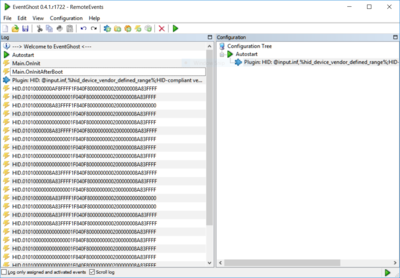
- Generic HID Plugin
Both MCE Remote plugin screenshots are next. Neither one produce any events. The MCE Remote for Win 7 has a recommened installation component that I did use, and a reboot was performed.
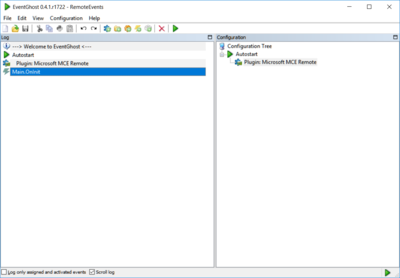
- MCE Remote Plugin
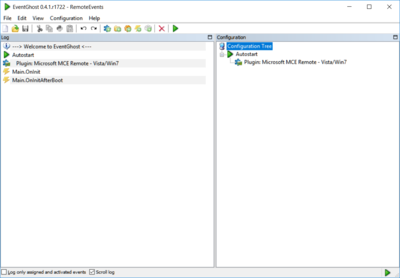
- MCE Remote Win7/Vista Plugin
What you say about NEC encoding is very interesting, and I will look more into this. The middle section of the events captured with the Generic HID do not change, and if could trigger macros off that portion I'd be good.
I am using the eHome drivers. For the MCE Windows 7 Remote I will attempt the fix you recommend and get my findings back to you tomorrow.
Thank you for your help! This program appears to be extremely powerful, and I can't wait to dig into it deeper.
-- Keplin
Re: MCE Plugin with MX-900 Remote
Posted: Thu Mar 23, 2017 2:10 pm
by Keplin
if you are using the Windows 7 MCE remote plugin and your remote uses the ehome drivers (this can be found in device manager) then try following the driver re-installation instructions located at this link
viewtopic.php?f=9&t=6044&p=44458&hilit=windows+7+mce+remote#p44458
Tried this numerous times. Each time I delete the drivers Windows boots up and installs them again, while continuing to push buttons to keep the IR port from deactivating. However, the results remain the same. I can see how this may resolve issues some people are experiencing, but I don't believe this is my issue.
Any other ideas?

-- Keplin
Re: MCE Plugin with MX-900 Remote
Posted: Fri Mar 24, 2017 8:40 am
by kgschlosser
ok no worries. i do like to start people off with the resetting of the drivers. as this does fix a lot of issues..
and as far as triggering a macro based on a portion of the code is not a problem.
below if a code block that can be used. below that code block i have also created the XML data for a whole macro with event already set up. for ease of use copy the XML data and then paste it into your configuration tree. I have put the code for the PythonScript in so you can read along as i explain what you will need to add
How you will use this is you are going to have to add every button. In the example i have created a variable called BUTTON it is a dictionary and think of it just like a real one. that contains keys or words. and definitions.
the key in the dictionary is the button name and the definition is a list of the ir codes that marry to that button. copy the line between the {}'s and paste it just below the Direction.Down entry. and alter the new line as needed for the new button.
you have to pick out the "rolling values" so in the case of the direction down those are the 2 values i saw. you can make these contain any section of the ir code as long as it is consecutive.
This is going to generate an event you will be able to use to trigger your macros
Code: Select all
BUTTONS = {
    'Direction.Down': ['1F040F8', '1F840F8'],
}

ircode = eg.eventString.split('.')[1]

for button in BUTTONS.keys():
    for code in BUTTONS[button]:
        if ircode.find(code) > -1:
            eg.TriggerEvent(prefix='Remote', suffix=button)
            eg.Exit()
***XML DATA***
Code: Select all
<?xml version="1.0" encoding="UTF-8" ?>
<EventGhost Version="0.5.0-beta6">
    <Folder Name="RemoteCodes" XML_Guid="{F430E7F3-FE7D-4EAE-A32A-D7499B1953A2}" Expanded="True">
        <Macro Name="Remote Codes" XML_Guid="{5B43E3B6-558D-4E8A-8EBF-D50B17566AEE}">
            <Event Name="HID.*" XML_Guid="{312E603C-6821-4893-94EF-04B880DF9BB3}" />
            <Action Name="Searching Remote Codes" XML_Guid="{9F314F85-0B31-44BB-867F-9E48E3F72CD4}">
                EventGhost.PythonScript(u"BUTTONS = {\n    'Direction.Down': ['1F040F8', '1F840F8'],\n}\n\nircode = eg.eventstring.split('.')[1]\n\nfor button in BUTTONS.keys():\n    for code in BUTTONS[button]:\n        if ircode.find(code) > -1:\n            eg.TriggerEvent(prefix='Remote', suffix=button)\n            eg.Exit()\n            ")
            </Action>
        </Macro>
    </Folder>
</EventGhost>
Re: MCE Plugin with MX-900 Remote
Posted: Fri Mar 24, 2017 8:43 am
by kgschlosser
With windows 10 there have been reported issues with windows driver signing problems. we will be working through these however it is going to take some time. in Windows 10 they have locked out the use of unsigned drivers forcing every driver that is made to be registered with Microsoft. The above is a band-aid but it will get you going
Re: MCE Plugin with MX-900 Remote
Posted: Fri Mar 24, 2017 7:45 pm
by Keplin
I like what I see... I went down a very similar path here, and I'll have to take a few moments to explore your code example. I'm new to python but not programming, so the native constructs and syntax are going to take me a little getting used to. Your code example is much more elegant than what I have come up with, and I"ve been thinking on how to improve mine to help reduce execution time (not that it's currently an issue.)
This is what I've done so far:
Created a wildcard
HID.* event that triggers this code snippet (so far only arrows, enter, and escape are mapped)
Code: Select all
newValue = eg.event.suffix
down1 = "1F040F"
down2 = "1F840F"
up1 = "1E040F"
up2 = "1E840F"
left1 = "20040F"
left2 = "20840F"
right1 = "21040F"
right2 = "21840F"
enter1 = "0B040F"
enter2 = "0B840F"
escape1 = "23040F"
escape2 = "23840F"
#elif ((1 in newValue) or (2 in newValue)):
#    eg.TriggerEvent("")
if ((up1 in newValue) or (up2 in newValue)):
    eg.TriggerEvent("Up")
elif ((down1 in newValue) or (down2 in newValue)):
    eg.TriggerEvent("Down")
elif ((left1 in newValue) or (left2 in newValue)):
    eg.TriggerEvent("Left")
elif ((right1 in newValue) or (right2 in newValue)):
    eg.TriggerEvent("Right")
elif ((enter1 in newValue) or (enter2 in newValue)):
    eg.TriggerEvent("Enter")
elif ((escape1 in newValue) or (escape2 in newValue)):
    eg.TriggerEvent("Escape")
In turn all of those event triggers correspond to macros that execute a keyboard emulation. While a lot these keys currently work the more advanced funcitons (like bring a program to the foreground) would not. As far as I know there's no hybrid model to use native functionality and custom advanced keypushes, so all or nothing...
This currently looks like this in the config tree
I also had to disable Microsoft from interpreting the button pushes, so EG was solely allowed to handle them. The MCE remote for vista breaks the HID reception for some reason, so I went through some driver trickery (dirty technique):
https://answers.yahoo.com/question/inde ... 617AAJ7LXR
In all I'm
extremely impressed with how powerful EG is. I can see myself using this for many applications down the road.
Thank you so much!
-- Keplin
Re: MCE Plugin with MX-900 Remote
Posted: Sat Mar 25, 2017 7:13 am
by kgschlosser
you can send keystrokes to a window that is not in the front..
You need to use the Find Window action then after that action use the keyboard emulator.. it will automatically pick up the hwnd (window handle) that was gotten from using the Find Window action and it will use that to send the keystrokes to.
now if you want to speed up the running time of your macros/scripts then eliminate the generation of a new event as this does take some time.
what i would do is this if you wanted to make it faster with a smallish amount of code.
Code: Select all
irCode = eg.eventString.split('.')[1]

def Up():
    eg.plugins.Window.FindWindow(u'firefox.exe', None, None, None, None, None, False, 0.0, 0)
    eg.plugins.Window.SendKeys(u'{Up}', False, 2)

def Down():
    eg.plugins.Window.FindWindow(u'firefox.exe', None, None, None, None, None, False, 0.0, 0)
    eg.plugins.Window.SendKeys(u'{Down}', False, 2)

BUTTONS = {
    ("1F040F", "1F840F"): Down,
    ("1E040F", "1E840F"): Up,
}

for buttonCodes in BUTTONS.keys():
    for code in buttonCodes:
        if code in irCode:
            BUTTONS[buttonCodes]()
            eg.Exit()

eg.PrintNotice("Code Not Found: " + irCode)
and python has really simplified coding.. it looks like you are a c/cpp coder.
Code: Select all
if ((up1 in newValue) or (up2 in newValue)):
    eg.TriggerEvent("Up")
can be simplified by doing
Code: Select all
if up1 in newValue or up2 in newValue:
    eg.TriggerEvent("Up")
just as a little suggestion to remove the preifx of "Main" from any events you generate
use keywords to specify prefix and suffix. this will make it alittle easier to identify the event being generated
Code: Select all
eg.TriggerEvent(prefix="Remote", suffix="Up")
Re: MCE Plugin with MX-900 Remote
Posted: Sat Mar 25, 2017 7:16 am
by kgschlosser
i forgot to mention that for any action if you right click it and click on copy as python you can paste the literal python command to execute the same thing that the tree action does.
There is one exception to this... if you copy something and it contains XmlIdLink they can only be used from a tree action and not a python command. this is typically any action that can influence another tree item (Jump, Enable, Disable) those kinds of actions