Notice: This forum has been recovered from an old backup, so some content, links, and dates may be outdated. The forum is currently read-only while we restore sign-in and registration functionality. Details

If you find this forum valuable and would like to help keep it online, donations to help cover hosting and domain costs are greatly appreciated, but never expected. You can support the forum through Buy Me a Coffee or Ko-fi. Thank you for helping preserve the EventGhost community.

[Solved] FindWindow loop - the most efficient solution

If you have a question or need help, this is the place to be.
Post Reply
xavier
Posts: 6
Joined: Mon Oct 11, 2010 9:36 am

[Solved] FindWindow loop - the most efficient solution

Post by xavier »

Hi,

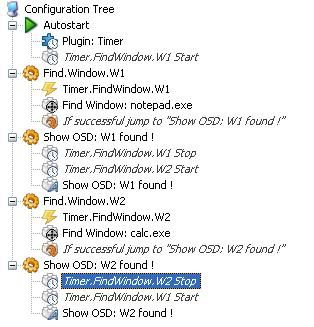
I need to check the random appearance of two windows and, when a window appears, perform an action.

I wrote a simple routine that controls when it appears notepad or calc, but the traybar EventGhost icon flashes continuously and log window is full of messages.

Image

Is there a better way of my code?
Attachments
FindWindow sample.xml
(2.5 KiB) Downloaded 112 times
Last edited by xavier on Tue Oct 12, 2010 9:30 pm, edited 1 time in total.
stottle
Plugin Developer
Posts: 636
Joined: Sun Apr 26, 2009 10:59 pm

Re: [Help] FindWindow loop - the most efficient solution

Post by stottle »

If there is a Task event generated when the windows open (should be for calc and notepad, but I doubt that's really what you are looking for), you could run your actions off of those instead of checking manually.

If not, the best bet would probably be to create a simple plugin that runs the findwindow in a loop (or better yet, uses a hook - but that is more complicated) in a separate thread and only generates events on success.

Brett
xavier
Posts: 6
Joined: Mon Oct 11, 2010 9:36 am

Re: [Help] FindWindow loop - the most efficient solution

Post by xavier »

stottle wrote:If there is a Task event generated when the windows open (should be for calc and notepad, but I doubt that's really what you are looking for), you could run your actions off of those instead of checking manually.
My code was just one example. I really need to intercept a modal dialog box and a message box, but the code would be too complicated to present.
stottle wrote:If not, the best bet would probably be to create a simple plugin that runs the findwindow in a loop (or better yet, uses a hook - but that is more complicated) in a separate thread and only generates events on success.
D'oh!

Your reply is very complex for my knowledge of EventGhost, but I will try to study EventGhost documentation for writing plugins, I hope to be able to resolve the problem.
User avatar
Pako
Plugin Developer
Posts: 2294
Joined: Sat Nov 11, 2006 1:31 pm
Location: Czech Republic
Contact:

Re: [Help] FindWindow loop - the most efficient solution

Post by Pako »

The window that you're watching, certainly has a corresponding item in the Windows Task Manager.
If the presence of the item coincides with the appearance of the window, your problem is solved.
You can use this my plugin.
If not, you can at least find inspiration there.
Pako
xavier
Posts: 6
Joined: Mon Oct 11, 2010 9:36 am

Re: [Help] FindWindow loop - the most efficient solution

Post by xavier »

Pako wrote:You can use this my plugin. If not, you can at least find inspiration there.
Wow, nice piece of code!

Unfortunately, the window that I find is a message box, and I do not detect any difference in the Task Manager.

So, where can I find documentation about the syntax of FindWindow and/or WindowMatcher?

I have tried in many examples given in the forum, but all refer to research of executables, never substring of text in many windows.
User avatar
Pako
Plugin Developer
Posts: 2294
Joined: Sat Nov 11, 2006 1:31 pm
Location: Czech Republic
Contact:

Re: [Help] FindWindow loop - the most efficient solution

Post by Pako »

Here is the documentation for the function eg.WindowMatcher.
The place where you want to use Wildcart, insert this string: {*}.
The best procedure to obtain the proper form of arguments is this:
1) Wait for the moment when the search window is displayed
2) Into configuration tree add action Find Window
3) Experiment with various items in the dialog box and test the result using the Test button (items can enable, disable, and strings can be edited, including the use of wildcard)
4) Once the correct configuration found, save by pressing OK button
5) Use copy/paste (copy in the configuration tree in the Find Window item and paste in any text editor)
Pako
xavier
Posts: 6
Joined: Mon Oct 11, 2010 9:36 am

Re: [Help] FindWindow loop - the most efficient solution

Post by xavier »

Pako wrote:The best procedure to obtain the proper form of arguments is this:
With your code and your instructions I wrote this, that fires an event when I open a window that contains the string "Mozilla Firefox" in the title bar:

Code: Select all

version="0.0.0"

eg.RegisterPlugin(
    name = "Window Matcher",
    author = "xavier",
    version = version,
    canMultiLoad = False,
    description = (
        "Generates events if specific windows are detected."
    ),
)

from eg.cFunctions import GetProcessDict
from threading import Thread, Event
from os.path import splitext
#===============================================================================

class Text:
    suffix = "Matcher"
    prefix = "Window"
#===============================================================================

class ObserverThread(Thread):

    def __init__(
        self,
        period,
        plugin
    ):
        self.abort = False
        self.threadFlag = Event()
        self.running = True
        self.period = 0.5
        self.text = plugin.text
        Thread.__init__(self, name = 'WindowMatcherThread')


    def run(self):
        while not self.abort:
            FindWin = eg.WindowMatcher(None, u'Mozilla Firefox', None, None, None, None, False, 0.0, 0)
            hwnd = FindWin()
            if len(hwnd) > 0:
                eg.TriggerEvent(self.text.suffix+"."+"Mozilla Firefox", prefix = self.text.prefix),
                self.abort = True
            if self.abort:
                break
            self.threadFlag.wait(self.period)
            self.threadFlag.clear()


    def AbortObservation(self):
        self.abort = True
        self.threadFlag.set()
#===============================================================================

class WindowMatcher(eg.PluginBase):
    text = Text

    def __start__(self):

        period = 0.5
        ot = ObserverThread(
            period,
            self,
        )
        ot.start()
        self.observThread = ot
             

    def __stop__(self):
        if self.observThread:
            ot = self.observThread
            if ot.isAlive():
                ot.AbortObservation()
            del self.observThread
        self.observThread = None
Not very elegant as your code, but it works. :mrgreen:

It would be interesting to improve the code with a parametric interface (for manage the research of multiple windows), but for tonight I'll stop here.
Post Reply