Notice: This forum has been recovered from an old backup, so some content, links, and dates may be outdated. The forum is currently read-only while we restore sign-in and registration functionality. Details

If you find this forum valuable and would like to help keep it online, donations to help cover hosting and domain costs are greatly appreciated, but never expected. You can support the forum through Buy Me a Coffee or Ko-fi. Thank you for helping preserve the EventGhost community.

Leaving key pressed in Remote will only register one event

Questions and comments specific to a particular plugin should go here.
Post Reply
cyberyaga
Posts: 1
Joined: Sat Jul 23, 2011 12:39 pm

Leaving key pressed in Remote will only register one event

Post by cyberyaga »

I love EventGhost...

I've managed to setup XBMC with the Sony Remote control that came with my Home Theater receiver. Now I can control everything with 1 remote.

I'm Running Windows 7 x64, and my IR receiver is recognized as a "MS eHome IR Receiver". In EventGhost I have the "MCE Remote Win7" Pluggin. Everything is setup the way I want it. And it works. :D

Here is my Problem:
When I press a key on the remote (ex. UP) and leave it pressed it doesn't repeat. In EventGhost, when I press the same key it generates only one event
MceRemote.SIRC20.E2D39
(despite me leaving leaving the control key pressed).

I tried the same with a key that in the remote that I know repeats (channel up/down or volumen) and it only generates one event. So, if I want to scroll through my collection in XBMC, I have to keep pressing the button (which is a pain in the A$$).

Can Someone please tell me what I can do to get the keys to repeat when I leave them pressed?

Thanks in advance

IR Receiver: HP Media Center IR Receiver
Image

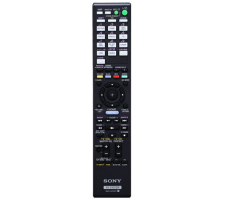
IR Remote Control: Sony RM-AAP061
Image
dukey
Posts: 6
Joined: Fri Oct 22, 2010 11:22 am

Re: Leaving key pressed in Remote will only register one eve

Post by dukey »

repeats work with winlirc using an mce, trouble is my 64bit plugin has had limited testing, if any lol
But you can try using it through eventghost, it should work
jonib
Plugin Developer
Posts: 1328
Joined: Thu Mar 26, 2009 9:33 pm
Location: Sweden

Re: Leaving key pressed in Remote will only register one eve

Post by jonib »

cyberyaga wrote:Can Someone please tell me what I can do to get the keys to repeat when I leave them pressed?
Add a Autorepeat current macro action to the macros you want to repeat.

jonib
XBMC2 plugin to control XBMC. If you want to flatter me Image
altainta
Posts: 29
Joined: Sun Nov 28, 2010 5:58 am

Re: Leaving key pressed in Remote will only register one eve

Post by altainta »

hmm
I tested a lot of remotes and came on this conclusion that some remote do not repeat after they are kept pressed...
I don't know how this will help you but there are atleast 5% of the remote that will not send repeat signal. This is bad for eventghost in some cases
example if u want to add a system volume + or - for the button which doesn't send repeat code than u have to re press and repress again and again to achieve the desired result but in normal scenario it should increase when it is kept pressed.

The non-repeating button can be used for certain task though like. open app, signal events etc.

So search for a remote that send repeat signal there are many remotes. Normally NEC remotes send repeat codes also there are Common DVD remotes which sends repeat signal.

Will see if there is any technical answer to this. suffering from the same problem. And it can't be solved with Auto Repeat still have to press two times.
dukey
Posts: 6
Joined: Fri Oct 22, 2010 11:22 am

Re: Leaving key pressed in Remote will only register one eve

Post by dukey »

i've yet to come across a remote control that doesn't send repeats ..
Post Reply