Hello,
i bought PowerDVD12 and i want to use EventGhost to control it with my remote. The PowerDVD plugin doesnt work anymore, since its only for 7 and 8. I created my own macros emulating keypresses and send them to powerdvd. This works for up/down/left/right, but enter or return is sent to powerdvd and nothing happens. If i press enter or return in powerdvd on my keyboard it works fine. Can anyone help me?
Notice: This forum has been recovered from an old backup, so some content, links, and dates may be outdated. The forum is currently read-only while we restore sign-in and registration functionality. Details
If you find this forum valuable and would like to help keep it online, donations to help cover hosting and domain costs are greatly appreciated, but never expected. You can support the forum through Buy Me a Coffee or Ko-fi. Thank you for helping preserve the EventGhost community.
If you find this forum valuable and would like to help keep it online, donations to help cover hosting and domain costs are greatly appreciated, but never expected. You can support the forum through Buy Me a Coffee or Ko-fi. Thank you for helping preserve the EventGhost community.
PowerDVD 12
-
themaster1
- Experienced User
- Posts: 133
- Joined: Wed Feb 03, 2010 9:02 pm
Re: PowerDVD 12
I have pdvd10 so not sure it'll help you but but when you create emulate keystrokes there is an option "use alternate method to emulate keypresses" this should help
useful link:
http://www.keyxl.com/aaab43b/275/PowerD ... rtcuts.htm
useful link:
http://www.keyxl.com/aaab43b/275/PowerD ... rtcuts.htm
Re: PowerDVD 12
Same problem here. Alternate method doesn't help.
I've modified the PowerDVD plugin so that at least some keys works such as play, stop, fullscreen, navigate left, right, up and down etc. I've disabled Navigation Enter for now since I couldn't get it to work.
I've modified the PowerDVD plugin so that at least some keys works such as play, stop, fullscreen, navigate left, right, up and down etc. I've disabled Navigation Enter for now since I couldn't get it to work.
Last edited by vuego on Fri Jan 04, 2013 1:54 pm, edited 1 time in total.
Re: PowerDVD 12
Hello everyone. I struggled a bit with this myself and have the answer. The plugin works fine, however, on blurays a special BD-J keyboard option *can* be enabled. Disable it and things should work normally.
Uncheck the "Enable BD-J keyboard" option in Settings/Blu-Ray Disc Setting/BD-J Keyboard Support
Uncheck the "Enable BD-J keyboard" option in Settings/Blu-Ray Disc Setting/BD-J Keyboard Support

Re: PowerDVD 12
Power DVD is a great app for playing DVD movies and i am using Power DVD 9 right now and i just update it and i find it very best.
Re: PowerDVD 12
What do you mean by "BD-J keyboard option *can* be enabled"? I've tried it both enabled and disabled but EventGhost sending {Return} doesn't do anything.dswigger wrote:Hello everyone. I struggled a bit with this myself and have the answer. The plugin works fine, however, on blurays a special BD-J keyboard option *can* be enabled. Disable it and things should work normally.
Uncheck the "Enable BD-J keyboard" option in Settings/Blu-Ray Disc Setting/BD-J Keyboard Support
Which version of PowerDVD do you use?
Re: PowerDVD 12
I found out that "Navigation Enter" does work when the More Functions window is displayed and when using the Cinema Mode. It is now possible to navigate the menu, start playing, changing chapters and so on using this plugin 
I've added all functions I could find but disabled those that didn't work.
Note
1. Be sure to disable the BD-J keyboard support if using Classic Mode (Settings - Bly-ray Disc).
2. Open the More Functions window. Most EventGhost functions work if this window stays open for some reason. Unfortunately it's not possible to hide it but you can place it outside the screen or on another monitor.
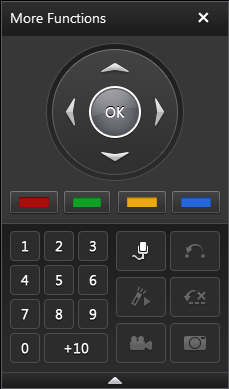
3. Or you can use the Cinema Mode and most EventGhost functions will work.
4. Some functions doesn't work in all modes such as Root Menu vs Menu List and they behave differently.
I've added all functions I could find but disabled those that didn't work.
Note
1. Be sure to disable the BD-J keyboard support if using Classic Mode (Settings - Bly-ray Disc).
2. Open the More Functions window. Most EventGhost functions work if this window stays open for some reason. Unfortunately it's not possible to hide it but you can place it outside the screen or on another monitor.
3. Or you can use the Cinema Mode and most EventGhost functions will work.
4. Some functions doesn't work in all modes such as Root Menu vs Menu List and they behave differently.
- Attachments
-
- __init__.py
- (6.16 KiB) Downloaded 327 times
Re: PowerDVD 12
5. The More Functions trick does not work when using 3D mode. It looks a bit different and EventGhost is unable to send most commands once again 
If someone decides to make an update to this plugin, I suggest taking a look at the PowerDVD remote app since it is communicating with PowerDVD over Ethernet instead of SendKeys. Making an EventGhost plugin using that protocol would also allow PowerDVD on another computer to be controlled
If someone decides to make an update to this plugin, I suggest taking a look at the PowerDVD remote app since it is communicating with PowerDVD over Ethernet instead of SendKeys. Making an EventGhost plugin using that protocol would also allow PowerDVD on another computer to be controlled
-
Neytrino-OnLine

- Experienced User
- Posts: 99
- Joined: Tue Aug 20, 2013 7:14 pm
- Location: Moscow, Russia
Re: PowerDVD 12
Hi guys, I'm shocked that noone still not found/made solutions.
I think, I found one:
We need the additional application - NirCMD (it can be found here), using parameter "sendkeypress" you can emulate hotkey pressings...
And it works! (for my PowerDVD 16 Ultra, also I think it will work for other previus versions)
I think, I found one:
We need the additional application - NirCMD (it can be found here), using parameter "sendkeypress" you can emulate hotkey pressings...
Code: Select all
<?xml version="1.0" encoding="UTF-8" ?>
<EventGhost Version="1722">
    <Macro Name="Play/Pause" Expanded="True">
        <Event Name="(YouEvent).Play" />
        <Action>
            Window.FindWindow(u'PowerDVD.exe', None, u'PowerDVD16', None, None, None, True, 0.0, 0)
        </Action>
        <Action>
            Window.BringToFront()
        </Action>
        <Action>
            System.Execute(u'(ProgrammFolder)\\nircmd.exe', u'sendkeypress spc', 0, False, 2, u'(ProgrammFolder)\\', False, False, u'', False, False, False, False)
        </Action>
    </Macro>
</EventGhost>Sin┬®erely yours, Neytrino.