
Sem;colon
I need your help.
In the Remote Controls topic, I asked shaggy79 to get me the Vendor ID and Product ID of his MCE compatible receiver, by using Procedure 01.
That procedure seemed adequate for most devices, but I do not know about the MCE devices.
The only information he can find is CIRCLASS\IrDeviceV2.
Unfortunately, I do not have an MCE remote device, so I am not sure on how to proceed.
Do all the remotes that are MCE compatible identify themselves as CIRCLASS\IrDeviceV2 ?
What I am really wanting to find out is: is there a reliable step-by-step procedure that can give me the Vendor ID and Product ID of the MCE devices?
If there is, then I will add it to the Remote Control Diagnostics topic.
Thanks, WharfRat/ControlFreak.
Notice: This forum has been recovered from an old backup, so some content, links, and dates may be outdated. The forum is currently read-only while we restore sign-in and registration functionality. Details
If you find this forum valuable and would like to help keep it online, donations to help cover hosting and domain costs are greatly appreciated, but never expected. You can support the forum through Buy Me a Coffee or Ko-fi. Thank you for helping preserve the EventGhost community.
If you find this forum valuable and would like to help keep it online, donations to help cover hosting and domain costs are greatly appreciated, but never expected. You can support the forum through Buy Me a Coffee or Ko-fi. Thank you for helping preserve the EventGhost community.
Microsoft MCE Remote - Vista and newer
Re: Microsoft MCE Remote - Vista and newer
EventGhost 0.4.1.r1640
PHX01RN plugin v3.0.1
Windows XP 32bit (v5.1 Build 2600 Service Pack 2)
Windows7 64bit (v6.1 Build 7601 Service Pack 1)
PHX01RN plugin v3.0.1
Windows XP 32bit (v5.1 Build 2600 Service Pack 2)
Windows7 64bit (v6.1 Build 7601 Service Pack 1)
Re: Microsoft MCE Remote - Vista and newer
Hi WharfRat/ControlFreak,
on the receiver itself it says "OVU4003/00".
In the Device Manager:
Under "Human interface devices" I have a "Microsoft eHome-Infrarottransceiver" with the device instance path "CIRCLASS\IRDEVICEV2\1&79F5D87&0&PORT1".
AND under "USB-Controller" there is also a "eHome-Infrarotempfänger (USBCIR)" with the device instance path "USB\VID_0471&PID_0815\PH00HPTJ".
I hope this helps!
on the receiver itself it says "OVU4003/00".
In the Device Manager:
Under "Human interface devices" I have a "Microsoft eHome-Infrarottransceiver" with the device instance path "CIRCLASS\IRDEVICEV2\1&79F5D87&0&PORT1".
AND under "USB-Controller" there is also a "eHome-Infrarotempfänger (USBCIR)" with the device instance path "USB\VID_0471&PID_0815\PH00HPTJ".
I hope this helps!
If you like my work,  me a drink
me a drink Re: Microsoft MCE Remote - Vista and newer
CIRCLASS\IRDEVICEV2\1&79F5D87&0&PORT1Sem;colon wrote: In the Device Manager:
Mine's the same:
CIRCLASS\IRDEVICEV2\1&79F5D87&0&PORT1
AND under "USB-Controller" there is also a "eHome-Infrarotempfänger (USBCIR)" with the device instance path:
USB\VID_0471&PID_0815\PH00HPTJ
USB\VID_045E&PID_006D\MS1QCMZK
but a bit different there, and the English version: eHome Infrared Receiver (USBCIR)
Re: Microsoft MCE Remote - Vista and newer
Thanks for the reply Sem;colon and blaher...
I seems that both of you are using the same remote, can both of you tell me what you are actually using?
I seems that both of you are using the same remote, can both of you tell me what you are actually using?
EventGhost 0.4.1.r1640
PHX01RN plugin v3.0.1
Windows XP 32bit (v5.1 Build 2600 Service Pack 2)
Windows7 64bit (v6.1 Build 7601 Service Pack 1)
PHX01RN plugin v3.0.1
Windows XP 32bit (v5.1 Build 2600 Service Pack 2)
Windows7 64bit (v6.1 Build 7601 Service Pack 1)
Re: Microsoft MCE Remote - Vista and newer
An HP one that looks like this:
http://eubolist.files.wordpress.com/201 ... -mce-2.jpg
http://eubolist.files.wordpress.com/201 ... -mce-3.jpg
I actually use a Pronto remote, but I use the HP IR receiver in the picture with it.
http://eubolist.files.wordpress.com/201 ... -mce-2.jpg

http://eubolist.files.wordpress.com/201 ... -mce-3.jpg
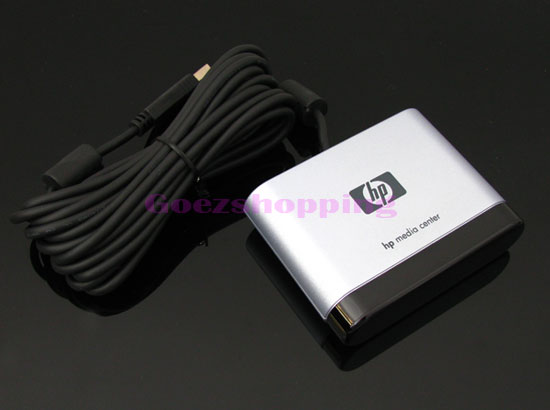
I actually use a Pronto remote, but I use the HP IR receiver in the picture with it.
Re: Microsoft MCE Remote - Vista and newer
mine looks like this:
And the receiver like this:
If you like my work, me a drink
me a drink Re: Microsoft MCE Remote - Vista and newer
Hi all.
Have tried using this plugin many times since building my HTPC last year, but find the AlternateMceIrService loves to stop itself, especially after I sleep my machine.
Now, I see some work has been done to fix this issue, but experimenting with it today I see EG needs to be run as Admin on my machine to allow the restarting of the service to actually happen.
Is there a way around this? As the AlternateMceIrService was implemented to eliminate the issue with needing admin privileges to interact with the standard IR service, it doesn't seem right to me that running as admin be the only solution?
Have tried using this plugin many times since building my HTPC last year, but find the AlternateMceIrService loves to stop itself, especially after I sleep my machine.
Now, I see some work has been done to fix this issue, but experimenting with it today I see EG needs to be run as Admin on my machine to allow the restarting of the service to actually happen.
Is there a way around this? As the AlternateMceIrService was implemented to eliminate the issue with needing admin privileges to interact with the standard IR service, it doesn't seem right to me that running as admin be the only solution?
Re: Microsoft MCE Remote - Vista and newer
The creator of the plugin didn't release the source code of the AlternateMceIrService (as far as I know), so I cannot modify it.Wyrm_1972 wrote:Is there a way around this? As the AlternateMceIrService was implemented to eliminate the issue with needing admin privileges to interact with the standard IR service, it doesn't seem right to me that running as admin be the only solution?
Maybe the Windows Service recovery options can provide a similar functionality like running EG as admin.
http://mdenomy.wordpress.com/2008/02/28 ... -services/
Or you can use a 3rd party tool that monitors and restart that service.
If you like my work, me a drink
me a drink Re: Microsoft MCE Remote - Vista and newer
Thanks for the reply. At least it's expected behavior and not something strange in my set-up.Sem;colon wrote: The creator of the plugin didn't release the source code of the AlternateMceIrService (as far as I know), so I cannot modify it.
Is the service actually required to send IR blaster commands? That's the functionality I'm most interested in.
Another thought that occurred to me is that it's not necessary to use the service to receive MCE IR commands. I played around with AHK scripts a while back that simply request system messages be sent to them from the appropriate HID device. It worked fine with the remote and didn't require admin privileges. While I'm not a Python programmer, the technique would work there too, as that's how system power events are handled by EG (for instance, as I've had a play around with them to capture away mode power events and that's how it works).
Re: Microsoft MCE Remote - Vista and newer
Sem;colon and blaher (and Wyrm_1972 and anyone else) ...
Thanks for the info about your remotes.
First of all, to get my Procedure 01 instructions correct, which version of Windows are you using.
(sometimes I see Device Instance Path and sometimes I see Device Instance ID)
But, to continue our story...
The VID and PID are the same, except blaher had some extra numbers.
Clearly, you both have different MCE remotes.
blaher has an older version of 0019, and I do know that there is at least one other older version of it.
I will do some searching for them again so that it (blahers version) can go into the catalogue.
Sem;colon has a variation of 0029 which has the extra Teletext buttons.
I remember seeing some variations of 0029 on the XBMC website, but I have not catalogued them yet.
I will get around to that eventually also.
This makes me wonder about things a little bit.
I asked shaggy79 to get me his VID and PID, and he got different numbers than you two did.
If I remember correctly (I have asked him to confirm this), he was using the original MCE remote plugin (RP-0016).
I wonder if this plugin, I call it RP-0018, and perhaps RP-0017 somehow changes the VID and PID.
Maybe it has something to do with the AlternateMceIrService?
Have you guys ever had any experience with RP-0016, or even RP-0017?
Wyrm-1972:
If you could also check your VID and PID for me using the instructions from a few post up.
I think you said that you were using RP-0018 without the AlternateMceIrService.
And can you tell me (perhaps with a picture also) which remote control you are using?
If you are running RP-0018 without AlternateMceIrService, then we might be able to isolate this curiosity.
Things always remain interesting...
WharfRat/ControlFreak.
Thanks for the info about your remotes.
First of all, to get my Procedure 01 instructions correct, which version of Windows are you using.
(sometimes I see Device Instance Path and sometimes I see Device Instance ID)
But, to continue our story...
The VID and PID are the same, except blaher had some extra numbers.
Clearly, you both have different MCE remotes.
blaher has an older version of 0019, and I do know that there is at least one other older version of it.
I will do some searching for them again so that it (blahers version) can go into the catalogue.
Sem;colon has a variation of 0029 which has the extra Teletext buttons.
I remember seeing some variations of 0029 on the XBMC website, but I have not catalogued them yet.
I will get around to that eventually also.
This makes me wonder about things a little bit.
I asked shaggy79 to get me his VID and PID, and he got different numbers than you two did.
If I remember correctly (I have asked him to confirm this), he was using the original MCE remote plugin (RP-0016).
I wonder if this plugin, I call it RP-0018, and perhaps RP-0017 somehow changes the VID and PID.
Maybe it has something to do with the AlternateMceIrService?
Have you guys ever had any experience with RP-0016, or even RP-0017?
Wyrm-1972:
If you could also check your VID and PID for me using the instructions from a few post up.
I think you said that you were using RP-0018 without the AlternateMceIrService.
And can you tell me (perhaps with a picture also) which remote control you are using?
If you are running RP-0018 without AlternateMceIrService, then we might be able to isolate this curiosity.
Things always remain interesting...
WharfRat/ControlFreak.
EventGhost 0.4.1.r1640
PHX01RN plugin v3.0.1
Windows XP 32bit (v5.1 Build 2600 Service Pack 2)
Windows7 64bit (v6.1 Build 7601 Service Pack 1)
PHX01RN plugin v3.0.1
Windows XP 32bit (v5.1 Build 2600 Service Pack 2)
Windows7 64bit (v6.1 Build 7601 Service Pack 1)
Re: Microsoft MCE Remote - Vista and newer
I was actually referring to being able to poll the IR receiver using another scripting language (that didn't require admin or a service to run). i.e. not using EG at all.WharfRat wrote:Sem;colon and blaher (and Wyrm_1972 and anyone else) ...
If you are running RP-0018 without AlternateMceIrService, then we might be able to isolate this curiosity.
WharfRat/ControlFreak.
More of an interesting aside than anything else.
Re: Microsoft MCE Remote - Vista and newer
Hello WharfRat,
I use Windows 8.1 Pro in German.
I don't beleve the AlternateMceIrService can change this values, as they come from the Hardware.
Also the AlternateMceIrService is not a driver as far as I know.
It's more likely, that there are a lot of different MS MCE remotes
I use Windows 8.1 Pro in German.
I don't beleve the AlternateMceIrService can change this values, as they come from the Hardware.
Also the AlternateMceIrService is not a driver as far as I know.
It's more likely, that there are a lot of different MS MCE remotes
If you like my work, me a drink
me a drink Re: Microsoft MCE Remote - Vista and newer
Sem;colon and blaher...
For what it's worth, I get the following from usb.ids.
VID 0471 is Philips (or NXP)
PID 0815 is eHome Infrared Receiver
This is hardly surprising, since Philips created the RC-6 (and RC-5) protocol.
VID 045E is Microsoft Corp.
PID 006D is eHome Remote Control Keyboard keys
As I understand it, the WMC/MCE remotes use RC-6 as well as Microsoft/MSK Quatro Pulse protocols.
I have also taken a quick look at the Green Button Specification, very interesting...
WharfRat/ControlFreak
For what it's worth, I get the following from usb.ids.
VID 0471 is Philips (or NXP)
PID 0815 is eHome Infrared Receiver
This is hardly surprising, since Philips created the RC-6 (and RC-5) protocol.
VID 045E is Microsoft Corp.
PID 006D is eHome Remote Control Keyboard keys
As I understand it, the WMC/MCE remotes use RC-6 as well as Microsoft/MSK Quatro Pulse protocols.
I have also taken a quick look at the Green Button Specification, very interesting...
WharfRat/ControlFreak
EventGhost 0.4.1.r1640
PHX01RN plugin v3.0.1
Windows XP 32bit (v5.1 Build 2600 Service Pack 2)
Windows7 64bit (v6.1 Build 7601 Service Pack 1)
PHX01RN plugin v3.0.1
Windows XP 32bit (v5.1 Build 2600 Service Pack 2)
Windows7 64bit (v6.1 Build 7601 Service Pack 1)
Re: Microsoft MCE Remote - Vista and newer
Wyrm-1972...
I see, which scripting language?
But you did get your remote to work with this plugin once upon a time.
So it will still work with EventGost.
Can you still give me: a pic of the transmitter and receiver, the VID and PID, and perhaps the make and model?
This info is for the Remote Controls catalogue.
Thanks.
I see, which scripting language?
But you did get your remote to work with this plugin once upon a time.
So it will still work with EventGost.
Can you still give me: a pic of the transmitter and receiver, the VID and PID, and perhaps the make and model?
This info is for the Remote Controls catalogue.
Thanks.
EventGhost 0.4.1.r1640
PHX01RN plugin v3.0.1
Windows XP 32bit (v5.1 Build 2600 Service Pack 2)
Windows7 64bit (v6.1 Build 7601 Service Pack 1)
PHX01RN plugin v3.0.1
Windows XP 32bit (v5.1 Build 2600 Service Pack 2)
Windows7 64bit (v6.1 Build 7601 Service Pack 1)
Re: Microsoft MCE Remote - Vista and newer
Sem;colon...
Thanks for the Windows version info, and the AlternateMceIrService info.
So, some devices report the VIDs/PIDs that you and blaher had, while others do not.
This is then independent of which of the three plugins is being used.
I will move the Device Manager detection steps out of Procedure 01 into a separate procedure.
It will simplify Procedure 01, and be more applicable to a separate task, as was needed here.
I have not modified the Device Manager VID/PID detection steps yet, but that will happen in the new procedure.
It is not a tragedy, but I was hoping to find some kind of unique hardware ID somewhere.
I have started reading the Green Button Specification, maybe there is something in there.
At least we know that CIRCLASS\IrDeviceV2 and eHome Infrared Receiver (USBCIR) identify the remotes as MCE compatible.
New question: are these three MCE remote plugins capable of working with more than one MCE remote device?
shaggy79 has a card reader with a MCE receiver, but wants to get the 0019 MCE receiver/blaster.
Another question: does the registry hack that allows you to decode other remote control protocols also work with RP-0017 as well?
I ask too many questions and favours...
Thanks for the Windows version info, and the AlternateMceIrService info.
So, some devices report the VIDs/PIDs that you and blaher had, while others do not.
This is then independent of which of the three plugins is being used.
I will move the Device Manager detection steps out of Procedure 01 into a separate procedure.
It will simplify Procedure 01, and be more applicable to a separate task, as was needed here.
I have not modified the Device Manager VID/PID detection steps yet, but that will happen in the new procedure.
It is not a tragedy, but I was hoping to find some kind of unique hardware ID somewhere.
I have started reading the Green Button Specification, maybe there is something in there.
At least we know that CIRCLASS\IrDeviceV2 and eHome Infrared Receiver (USBCIR) identify the remotes as MCE compatible.
New question: are these three MCE remote plugins capable of working with more than one MCE remote device?
shaggy79 has a card reader with a MCE receiver, but wants to get the 0019 MCE receiver/blaster.
Another question: does the registry hack that allows you to decode other remote control protocols also work with RP-0017 as well?
I ask too many questions and favours...
EventGhost 0.4.1.r1640
PHX01RN plugin v3.0.1
Windows XP 32bit (v5.1 Build 2600 Service Pack 2)
Windows7 64bit (v6.1 Build 7601 Service Pack 1)
PHX01RN plugin v3.0.1
Windows XP 32bit (v5.1 Build 2600 Service Pack 2)
Windows7 64bit (v6.1 Build 7601 Service Pack 1)