Notice: This forum has been recovered from an old backup, so some content, links, and dates may be outdated. The forum is currently read-only while we restore sign-in and registration functionality. Details

If you find this forum valuable and would like to help keep it online, donations to help cover hosting and domain costs are greatly appreciated, but never expected. You can support the forum through Buy Me a Coffee or Ko-fi. Thank you for helping preserve the EventGhost community.

SageTV client initial eventghost setup

If you have a question or need help, this is the place to be.
Post Reply
mcaron1234
Posts: 2
Joined: Thu Oct 04, 2007 3:04 am

SageTV client initial eventghost setup

Post by mcaron1234 »

Hi - I am hoping to use eventghost with my streamzap and sagetv to solve a small problem. I have my sage client running to a pc monitor and a HDTV. Whenever my wife is using sage and I am using the computer we are constantly having to switch focus back to sage to get the remote to work. I think eventghost can be configured to solve this if sage is the only thing it is setup for, correct?

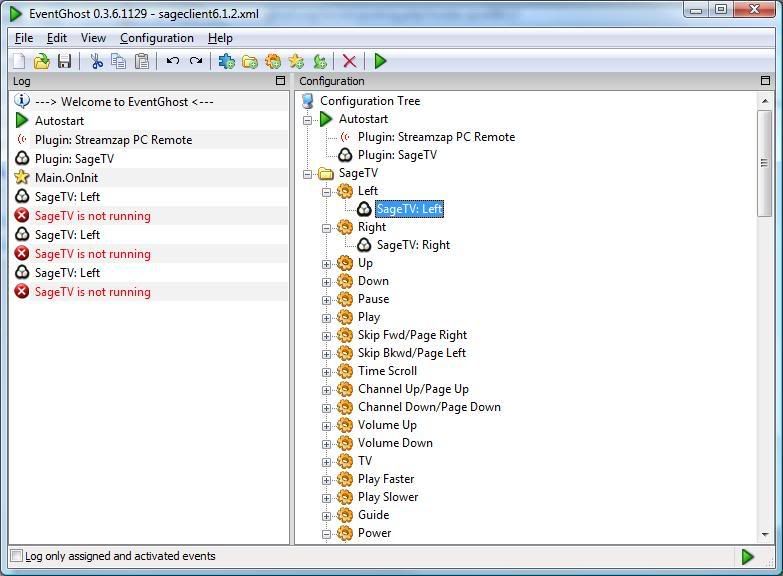
Anyway the problem I'm having is in the initial configuration of Sage. I'm running sageclient v6.2.10 and v 0.3.6.1129. Here is a screen shoot of my config so far:

Image

As you can see from the screenshot - eventghost says sage is not running. Could this be because the plugin is written for the main sagetv not sageclient? if so, can I do anything about it?


Thanks,

Matt

Edit: Also, the streamzap software is not running in the tray.
CollinR
Experienced User
Posts: 265
Joined: Tue Sep 05, 2006 7:16 am
Location: Oklahoma
Contact:

Re: SageTV client initial eventghost setup

Post by CollinR »

Working on a fix for the not seeing the client application.

In the left pane of Eventghost you should see the event come through from the streamzap.
Simply drag/drop the event from the left side to the SageTV command (inside the macro) you wish to map it to.
Now for things like volume you may wish to add an auto repeat so you can hold the button down like a normal remote.

You should probably also add in an enable exclusive for SageTV.

First add the exclusive plugin.
Now create a macro to enable SageTV exclusive mode.
Map a button to trigger that macro, on my FireFly I used the "TV" button. Only logical.

I created folders called things like global (for volume controls and exclusive triggers) and context (which did you delete that???).
CollinR
Experienced User
Posts: 265
Joined: Tue Sep 05, 2006 7:16 am
Location: Oklahoma
Contact:

Re: SageTV client initial eventghost setup

Post by CollinR »

Crap I don't have a machine that doesn't have an expired Client license. :(

Anyway IIRC the plugin is looking for SageTV.exe and you nee to change that to SageTVClient.exe. It shouldn't be too hard to do.
User avatar
Bitmonster
Site Admin
Posts: 2239
Joined: Mon Feb 06, 2006 10:28 pm

Re: SageTV client initial eventghost setup

Post by Bitmonster »

CollinR wrote:Crap I don't have a machine that doesn't have an expired Client license. :(

Anyway IIRC the plugin is looking for SageTV.exe and you nee to change that to SageTVClient.exe. It shouldn't be too hard to do.
Ah, in the latest beta I have fixed this in the plugin. You can now decide in it's configuration if you want to target SageTV.exe or SageTVClient.exe.
Please post software-related questions in the forum - PMs will only be answered, if really private, thanks!
CollinR
Experienced User
Posts: 265
Joined: Tue Sep 05, 2006 7:16 am
Location: Oklahoma
Contact:

Re: SageTV client initial eventghost setup

Post by CollinR »

Should have known you were a few steps ahead. :oops: :lol:
User avatar
Bitmonster
Site Admin
Posts: 2239
Joined: Mon Feb 06, 2006 10:28 pm

Re: SageTV client initial eventghost setup

Post by Bitmonster »

No... behind. I fixed it as I saw your mentioning of the SageTVClient.exe. Actually it is described in their documentation, but I hadn't implemented the choice till now:
http://www.sage.tv/2_papers/SageTVWindowsMessages.txt
Please post software-related questions in the forum - PMs will only be answered, if really private, thanks!
mcaron1234
Posts: 2
Joined: Thu Oct 04, 2007 3:04 am

Re: SageTV client initial eventghost setup

Post by mcaron1234 »

Awesome, thanks for the help guys - it was a combo of the sageclient.exe and not knowing to drag the events from left to right into the macro. Its working great now!

Matt
CollinR
Experienced User
Posts: 265
Joined: Tue Sep 05, 2006 7:16 am
Location: Oklahoma
Contact:

Re: SageTV client initial eventghost setup

Post by CollinR »

Now you see what I mean about you basically have to have very similar setups to swap configs.


You can use the EG command line interface from SageTV's "Dynamic Customisable Main Menu"
http://forums.sagetv.com/forums/showthread.php?t=13527

This way you can make all the custom menus you want, no limit like most hard button remotes. With an RF remote and transparent menus what more could you want!

You can use have EG to trigger SageTV events through wget to the "Web User Interface for SageTV 2.2-6.2"
http://forums.sagetv.com/forums/showthread.php?t=8426

This way you can have EG control a client system remotely, so I have a custom menu that lists every MVP client, by selecting it will kick it off the network. This will free up a tuner on SageTV.

So now I have another EG box that has an x10 remote controlling my MVP client, lights in the master bedroom, bath and spa, and controls the spa itself. :D This app can get really really addicitive, how ever much time you put in you'll get it back for it.


Every PC I own has EG installed and they pass info from one another depending on what hardware or software is located where.
Post Reply