Just wanted to chime in with some issues I've been having with this plugin and to make some suggestions to others. This is a lengthy post (really, grab a coffee), but I wanted to explain the situation fully.
Especially if I misspeak about any of the below, I have presented my full argument for others to comment upon.
I've posted about this over at the XBMC/Kodi forums here:
http://forum.kodi.tv/showthread.php?tid=241612
There is also a bug tracked in that post.
I will do a more lengthy explanation here since those on this forum are likely interested in the EG specifics.
FYI, I will use XBMC/Kodi interchangeably.
In short, the issue isn't with this plugin per-se, but with how Kodi now seems to handle JSON events or at least those JSON events related to video navigation..
Some background:
I set up EG along with the XBMC2 and MCE plugins with XBMC Gotham about 3 years ago. At the time I was using my HTPC for several things including XBMC, WMC (Netflix), Skype, House IPcam.
As of now the only thing I really use the HTPC for is XBMC. I upgraded to the latest stable release of Kodi (Isengard) about a month ago and since then I have been having issues.
Like many of you using this plugin you undoubtedly have your remote setup to trigger one or more of these XBMC2 actions based on your keypress.
Personally, I use a Harmony remote which sends
mostly MCE remote codes. Those MCE codes are interpreted differently based upon what activity I am using.
I then use some other "dummy" remote codes to switch between activities.
For example:
My "Right" remote button will send the MCE.Right event to EG. That MCE.Right triggers:
- XBMC2: Right
- "Right" command on my Netflix plugin.
If doesn't trigger both at the same time because not both control sets (in the form of EG folders) are active at the same time. I might use my "dummy" remote's codes numbers 1 and 2 for instance to toggle between either XBMC or Netflix (enable/disable the EG folders).
I found this system to be easiest, rather than trying to work with remote codes from tons of devices, I simply work with MCE codes and those codes are "context sensitive" depending on which application/activity I have active.
The above isn't super important to the problem, but it might give a basis for some other questions/suggestions/comments that come down the line.
Where things get complicated is the following...
Let's take for example a standard Kodi setup where you are NOT using EG. Specifically I mean you are not using the Microsoft MCE Remote plugin (which is the only way I know of to get MCE receiver events into EG).
IOW - you are just running Kodi with an MCE receiver plugged into your PC, no EventGhost.
Now Kodi natively supports the MCE remote. So, when you push "right" on your MCE remote, that "right" event is sent to Kodi and acted upon.
What Kodi does with that "right" event however really
depends on the current state of the application.
For instance. If I am watching a movie, the "right" remote press will send a "small step forward" to XBMC (which generally is a 30 second skip forward).
However, if I have first brought up the OSD (on screen menu), the "right" press won't skip forward the video, it will instead move the highlighted menu option to the right.
Same is true if I have the subtitle delay offset on screen - it will move the offset to the right.
Only when I EXIT any on screen menu does the right button skip the video again.
In essence, Kodi is "contextually aware" of what a specific button should do!!!
This same contextual awareness is present with the keyboard shortcuts for Kodi.
You will find that if you use the right arrow key on your keyboard the results will be the same as I mentioned above.
Alternatively, when using EG with the MCE plugin, the MCE remote codes are in effect
hijacked by EG and no longer go to Kodi natively.
This means that EG now works as a "proxy" between the received remote codes (triggers) and the commands that IT must send to Kodi.
The XBMC2 plugin works by using the JSON protocol to send API calls for each event. As a psuedo-example, the following is what might be sent over the API when you press the "right" button:
Code: Select all
{"jsonrpc": "2.0", "id": 1, "method": "Input.ExecuteAction", "params": {"action":"right"}},
The challenge with these API calls is that they are not simply a keystroke to be interpreted, they each define
a very specific function that you want Kodi to perform.
Therefore the above "right" command (aka XBMC2: Right) will move your highlight menu selection to the right, but it will
NOT perform a small step forward while you are watching a video.
IOW: (MCE Remote Code Right (native) = Right Arrow button on keyboard) <> JSON Input.Right
This leaves us with a dilemma:
Natively, Kodi accepts the Mce.Right and can perform BOTH of these operations using its "conceptual awareness",
but EG which proxies these with JSON calls would need to send MULTIPLE command in order to do multiple things.
So, for example, you would have a macro that when it receives the MCE.Right event, does both JSON calls:
- XBMC2.Right
- XBMC2.StepForward
This is, in fact, how I had my EG setup done with XBMC Gotham. And guess what? It worked.
Gotham appeared to have "contextual awareness" when receiving JSON commands the same way it did when issuing a keyboard command.
So, if my sutitle delay or OSD menus were on screen, an MCE.Right would send both JSON commands listed above, but XBMC only would
process the XBMC2.Right command.
It apparently understood that XBMC2.StepForward was not a reasonable command to execute if the menu was up on screen.
The issue at hand here is that this all changed in the Isengard release.
I don't think there was a fundamental change in how JSON interprets these commands, but I think it is due to a new feature that was introduced that changes the way video navigation is done:
http://kodi.wiki/view/Skip_steps
The latest releases (including the 16.x Jarvis betas) no longer have this contextual awareness and it seems that the skip step operations are ALWAYS invoked when sending the JSON commands.
This means it is no longer possible to use your directional buttons to control direction AND navigation within a video.
Solutions:
The first extremely simple solution is not to map more than one XBMC2 command to the same remote button.
In practice - this is easier said than done. Even on my button rich Harmony Remote, I don't feel I can sacrifice any buttons for this purpose.
I have 3 sets of buttons that might fit the bill:
Directional
- Right/Left
RW/FF
Chapter Forward/Chapter Back
Were I to change the Directional buttons to only send Right/Left and allow my RW/FF buttons to do Step Forward/Back, then what would I map XBMC2: FastForward and XBMC2: Rewind to?
In short, you will either need to map command to buttons that make no ergonomic/logical sense at all and/or you have to lose some other functionality.
The next solution might be to not use the MCE plugin at all and find some other way to get remote codes to EG. I suspect like myself, many of you have opted for MCE eHome IR receivers due to their cost and availability.
I suppose if you had another receiver you could send MCE code natively to XBMC and only have EG events for any non MCE codes you wish to map. This solution seems overly complex and costly.
The final solution, which is what I implemented, is to not use the XBMC2 JSON events and instead opt for simple EG keystrokes instead. As an example I would take my two previous macros:
Code: Select all
    <Macro Name="StepForward" >
        <Event Name="MceRemote.Mce.Right" />
        <Action>
            XBMC2.StepForward()
        </Action>
    </Macro>

    <Macro Name="Right" >
        <Event Name="MceRemote.Mce.Right" />
        <Action>
            XBMC2.Right()
        </Action>
    </Macro>
And simple change them to this:
Code: Select all
   <Macro Name="Right" >
        <Event Name="MceRemote.Mce.Right" />
        <Action>
            Window.SendKeys(u'{Right}', False, 2)
        </Action>
   </Macro>
The net result is you are simply changing your remote command to issue the equivalent of the right directional arrow keyboard shortcut for Kodi. Kodi will then interpret this command to the the correct operation contextually speaking.
You will notice that my resultant macro doesn't require the XBMC2 plugin at all to work. It simply uses the native Window functions of EG.
To be honest, based upon these issues I think it may be easier and safer (from a compatibility standpoint) to NOT use XBMC2 for most of the core functions.
This is no fault/blame on the XBMC2 plugin itself, it is just that Kodi can't be trusted to "do the right thing" with the commands it gets.
That isn't to say the plugin is without merit, and shouldn't be used at all. To the contrary!
There are many feature rich commands that JSON queries you can perform and with the notification options it truly delivers a two way communication experience.
These functions however are more advanced, and many people just looking to control the remote actions may not need them.
My personal recommendation is that you should not use ANY of the XBMC2 features for which there exist native keyboard shortcut options.
Instead, change those XBMC2 JSON commands to simply send the emulated keystroke. This is more reliable as far as Kodi interpretation is concerned.
When there is a command you wish to send where a native shortcut does not exist, there are two options:
- Create a new shortcut mapping in your Kodi keyboard.xml file
- Use the XBMC2 (JSON) command
I would probably opt for using XBMC2 calls in this case since it is easier to setup. If however those commands have conflicts like those discussed in this post, you might want to make the keyboard mappings in Kodi and simply send emulated keystrokes as well.
And, of course, if you wish to query Kodi or receive notifications, the XBMC2 plugin is of course the way to go!
UPDATE:
So I wanted to make an update here based on my misunderstanding of some of the features of the XBMC2 plugin. I went back to the first few pages in this thread and reviewed the codebase a little more.
While I won't claim to understand the code 100%, some additional things have been made clear to me.
Most if not all of what I said above is accurate, but there is some more flexibility in the plugin that I felt it would be remiss of me not to cover.
This plugin uses BOTH JSON AND/OR the Kodi EventServer for sending events.
The plugin is actually more complicated then I initially gave it credit for, and part of that is due to how the plugin presents itself. Take the below screenshot:
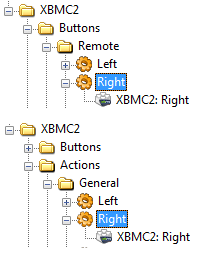
- xbmc commands.png (8.62 KiB) Viewed 5947 times
The shot shows two different folders of commands in the plugin:
- Buttons > Remote > Right
- Actions > General > Right
Both of these appear to execute the command "XBMC: Right"
This however is not the case, and what I will argue is a flaw in the GUI naming in this plugin. To its own discredit it seeks to make things appear simpler than they are. Initially I thought that both of these commands did the same thing, and they were simply organized in both places for someone looking for the particular option. But this is not the case. These are actually two different commands respectively:
- eg.plugins.XBMC2.RemoteRight()
- eg.plugins.XBMC2.Right()
It isn't entirely clear to me (perhaps jonib can give some more info) which calls go over JSON and which go over the EventServer.
I believe that everything under the "Buttons" folder is likely implemented through the EventServer, while the rest are likely implmented via JSON.
What this means is that the plugin can send in effect a native remote event to XBMC - or at least a command that the EventServer will then translate the same way it would getting a remote event.
What this means is that instead of sending either emulated keystrokes, or individual JSON events as I mention above in the solutions,
ANOTHER SOLUTION is to us the
Buttons > Remote set of commands.
Don't be confused (like I was) just because the GUI shows them both the same (e.g. "XBMC: Right") they actually are received by Kodi differently and will behave differently.
Personally, even after discovering this I am going to keep with my keyboard emulation. For one, I've already set it up and it works. Additionally, I have a feeling that sending an emulated keystroke is likely going to provide a slightly faster response time than sending a packet (even to the local interface). That being said, for anyone in a situation where EG does NOT reside on the same box that Kodi is on, this additional method is probably the best of all worlds.
Thanks for coming along for the ride as I work through this. Again, the most important thing to remember with all of this is:
There have been changes starting in Isengard that seem to affect how certain directional operations work. This is likely due to the skip-step implementation behaving in a non contextually aware way.
Those of us who were using the various JSON-RPC "actions" of the XBMC2 plugin might have had more than one action linked to a key-press.
It is possible that if those actions included the directional buttons (specifically right/left) that your functionality will be broken.
Again, I want to stress that this is not a fault with this plugin, but rather a change in Kodi.


 ).
). 

