Notice: This forum has been recovered from an old backup, so some content, links, and dates may be outdated. The forum is currently read-only while we restore sign-in and registration functionality. Details

If you find this forum valuable and would like to help keep it online, donations to help cover hosting and domain costs are greatly appreciated, but never expected. You can support the forum through Buy Me a Coffee or Ko-fi. Thank you for helping preserve the EventGhost community.

Streamzap / Eventghost issue (emulate keystroke) ***SOLVED

If you have a question or need help, this is the place to be.
Post Reply
rhouck
Posts: 3
Joined: Wed May 20, 2009 5:55 pm

Streamzap / Eventghost issue (emulate keystroke) ***SOLVED

Post by rhouck »

I have a Streamzap remote/IR as well as a Harmony 880. I setup Eventghost per this thread: http://xbmc.org/forum/showthread.php?t=44700

The problem is that it mostly works... except for a few buttons. For example, the basic navigation (up, down, left right) all works, as well as buttons like info and menu.

HOWEVER, pgup, pgdown and ENTER (this one is sort of important ) don't work.

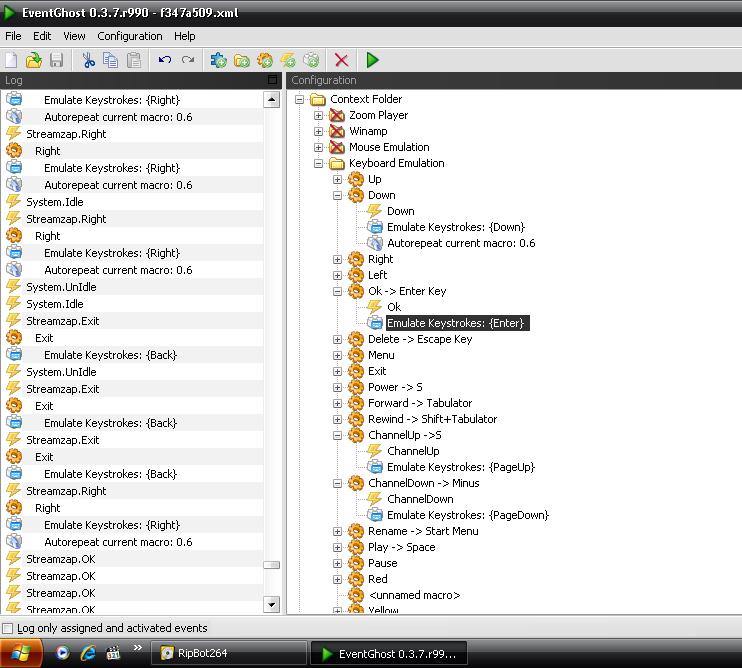
This is a screenshot of EG:
Image

You can see that it is receiving the command for "Ok" from the remote, it just isn't executing the assigned key command

I have tried creating an advancedsettings.xml in XBMC to enable the virtual keyboard but that did not change anything (unless I did it wrong)

I also tried binding the emulated keystroke to "Return" instead of "Enter" with no luck.

Any ideas? It mostly works, except for these 3 very important buttons and I feel like it's gotta be something obvious I am overlooking. This is on Win XP SP3 btw
Last edited by rhouck on Wed May 20, 2009 8:09 pm, edited 1 time in total.
User avatar
topix
Experienced User
Posts: 441
Joined: Sat May 05, 2007 3:43 pm
Location: Germany
Contact:

Re: Streamzap / Eventghost issue (emulate keystroke)

Post by topix »

I'm not 100% sure, but I think "OK" and "Ok" are different. Just drag and drop "Streamzap.OK" to the macro that should be executed.
rhouck
Posts: 3
Joined: Wed May 20, 2009 5:55 pm

Re: Streamzap / Eventghost issue (emulate keystroke) ***SOLVED

Post by rhouck »

topix wrote:I'm not 100% sure, but I think "OK" and "Ok" are different. Just drag and drop "Streamzap.OK" to the macro that should be executed.
Sigh you are 100% correct... that is embarrassing :oops: 1) I didn't fully understand how to setup EG myself and 2) I didn't even think to notice that the command was different.

In the unlikely event anyone in the future is as dense as me, the correct command was "Streamzap.OK" and then for the channel up and down it was "Streamzap.ChanelUp" (with "channel" spelled wrong)

Thanks for your help, hopefully I can get everything setup on my harmony smoothly from here :)
User avatar
Bitmonster
Site Admin
Posts: 2239
Joined: Mon Feb 06, 2006 10:28 pm

Re: Streamzap / Eventghost issue (emulate keystroke) ***SOLVED

Post by Bitmonster »

Oops, this is some copy&paste/typo bug in the source code of the Streamzap plugin. Sadly you will have to revert these changes in the next EG version again. The correct and unified spelling in EG-terms is actually "Ok" and "ChannelXxx".
Please post software-related questions in the forum - PMs will only be answered, if really private, thanks!
rhouck
Posts: 3
Joined: Wed May 20, 2009 5:55 pm

Re: Streamzap / Eventghost issue (emulate keystroke) ***SOLVED

Post by rhouck »

Bitmonster wrote:Oops, this is some copy&paste/typo bug in the source code of the Streamzap plugin. Sadly you will have to revert these changes in the next EG version again. The correct and unified spelling in EG-terms is actually "Ok" and "ChannelXxx".
I thought it was bizarre but, as the rest of the commands appear to work correctly, at least this is a relatively minor change to have to make :)
Post Reply