There are many people who can do it. This is a pretty simple thing.
It seems that they do not have time right now, so I'll do it.
You need to add plugin Timer to your configuration.
The entire solution is as follows:
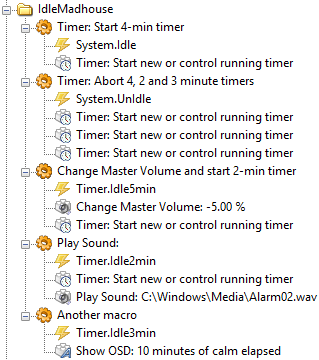
- IdleMadhouse.png (19.12 KiB) Viewed 2209 times
You can copy the code below and paste into your configuration tree.
Code: Select all
<?xml version="1.0" encoding="UTF-8" ?>
<EventGhost Version="1710">
    <Folder Name="IdleMadhouse" Expanded="True">
        <Macro Name="Timer: Start 4-min timer" Expanded="True">
            <Event Name="System.Idle" />
            <Action>
                Timer.TimerAction(u'Idle5min', 0, 1, 240.0, u'Idle5min', False, True, 1, u'00:00:00')
            </Action>
        </Macro>
        <Macro Name="Timer: Abort 4, 2 and 3 minute timers" Expanded="True">
            <Event Name="System.UnIdle" />
            <Action>
                Timer.TimerAction(u'Idle5min', 4, 1, 1.0, u'', False, True, 1, u'00:00:00')
            </Action>
            <Action>
                Timer.TimerAction(u'Idle2min', 4, 1, 1.0, u'', False, True, 1, u'00:00:00')
            </Action>
            <Action>
                Timer.TimerAction(u'Idle3min', 4, 1, 1.0, u'', False, True, 1, u'00:00:00')
            </Action>
        </Macro>
        <Macro Name="Change Master Volume and start 2-min timer" Expanded="True">
            <Event Name="Timer.Idle5min" />
            <Action>
                System.ChangeMasterVolumeBy(-5.0, u'Primary Sound Driver')
            </Action>
            <Action>
                Timer.TimerAction(u'Idle2min', 0, 1, 120.0, u'Idle2min', False, True, 1, u'00:00:00')
            </Action>
        </Macro>
        <Macro Name="Play Sound: " Expanded="True">
            <Event Name="Timer.Idle2min" />
            <Action>
                Timer.TimerAction(u'Idle3min', 0, 1, 180.0, u'Idle3min', False, True, 1, u'00:00:00')
            </Action>
            <Action>
                System.PlaySound(u'C:\\Windows\\Media\\Alarm02.wav', 1, False)
            </Action>
        </Macro>
        <Macro Name="Another macro" Expanded="True">
            <Event Name="Timer.Idle3min" />
            <Action>
                EventGhost.ShowOSD(u'10 minutes of calm elapsed', u'0;-64;0;0;0;700;0;0;0;238;3;2;1;66;Comic Sans MS', (237, 126, 245), (0, 0, 0), 4, (0, 0), 0, 30.0, True)
            </Action>
        </Macro>
    </Folder>
</EventGhost>
I noticed that according to your specifications, it may happen that after a few unfinished cycles, the volume can go to zero, so in fact the sound will not be heard.
Pako

