OK so this is really easy to achieve. this would be very useful if you have EG on one computer and blue iris on another where you wouldn't be able to use a batch file to trigger the event
You want to install the WebServer Plugin into EG and set the port to whatever you want. I do recommend using a username and password tho this is not required. You will want to make a folder somewhere as the HTML documents root and in that folder create a text file and rename it to index.html leave the file empty
You will need to go into the camera properties in blue iris and under the alerts tab.
under the alerts tab check the box next to Requests from a web service. then click on the configure button next to that.
under the configuration
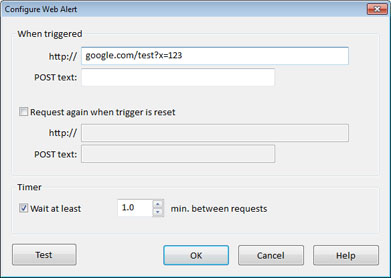
- webalert.jpg (40.44 KiB) Viewed 3610 times
in the when triggered you will want to enter under the http://
if no username and password was set
EVENTGHOST_IP_ADDRESS:WEBSERVER_PORT/index.html?SOME_CAMERA_NAME.MotionTriggered
if a username and password was set
YOUR_USER_NAME:YOUR_PASSWORD@EVENTGHOST_IP_ADDRESS:WEBSERVER_PORT/index.html?SOME_CAMERA_NAME.MotionTriggered
If you want to receive notification when the motion has stopped check the box next to Request again when trigger reset and enter the following in the http box
if no username and password was set
EVENTGHOST_IP_ADDRESS:WEBSERVER_PORT/index.html?SOME_CAMERA_NAME.MotionReset
if a username and password was set
YOUR_USER_NAME:YOUR_PASSWORD@EVENTGHOST_IP_ADDRESS:WEBSERVER_PORT/index.html?SOME_CAMERA_NAME.MotionReset

