Notice: This forum has been recovered from an old backup, so some content, links, and dates may be outdated. The forum is currently read-only while we restore sign-in and registration functionality. Details

If you find this forum valuable and would like to help keep it online, donations to help cover hosting and domain costs are greatly appreciated, but never expected. You can support the forum through Buy Me a Coffee or Ko-fi. Thank you for helping preserve the EventGhost community.

Eventghsot command line options to generate event

If you have a question or need help, this is the place to be.
Post Reply
aldi13
Posts: 25
Joined: Wed Jan 01, 2014 3:35 pm

Eventghsot command line options to generate event

Post by aldi13 »

EG team,

I have written a small basic batch file to create an event inside EG. I am attempting to trigger this batch file based on motion from my IP camera's. I use the Windows program Blueiris for my IP cameras. Blueiris does indeed have the option to call an .exe or a .bat on motion. However, it's not working for me.

Here is the contents of mainfloormotion.bat:

Code: Select all

"C:\Program Files (x86)\EventGhost\EventGhost.exe" -event BI.MainFloor.Motion
Like i said the .bat file works fine if I execute it manually outside of Blueiris. When I attempt to "Test" it with Blueiris I can see the CMD window pull up but then it hang's and doesn't finish processing the parameters. I contacted the Blueiris developer and he said that Blueiris simply: uses the "ShellExecute() on the file ..." I also tried converting my .bat file into an AHK script and turning that into an .exe. This didn't solve the problem either. I also tried creating a shortcut to the .bat and enable the run as admin flag. Any suggestions how to rework my script or figure out how to make this work? I have spent about 8 hours so far on this and still have not been able to figure it out.

Thanks in advance.

I am running Win 8.1 64bit
blaher
Experienced User
Posts: 487
Joined: Thu Nov 17, 2011 1:27 am

Re: Eventghsot command line options to generate event

Post by blaher »

You could try running another tiny .exe briefly and use EG's Task Create plugin to monitor that .exe for your trigger.
aldi13
Posts: 25
Joined: Wed Jan 01, 2014 3:35 pm

Re: Eventghsot command line options to generate event

Post by aldi13 »

Fantastic work around. Thanks for thinking of this. I can create a small "do nothing" .exe using autohotkey. Going to give this a try.
piert
Experienced User
Posts: 321
Joined: Tue Jun 14, 2011 2:53 pm

Re: Eventghsot command line options to generate event

Post by piert »

I use several IP camera's that have been programmed to take pictures when motion is detected.
The pictures are stored in a certain folder (the folder grows in size, but I use a free program called Belvedere to periodically remove and delete files that are older than a few days).
The Eventghost 'Directory Watcher' creates an event each time a photo is stored inside the folder.
This has worked for me very well.
aldi13
Posts: 25
Joined: Wed Jan 01, 2014 3:35 pm

Re: Eventghsot command line options to generate event

Post by aldi13 »

Process Watcher work great.

I created a small autohotkey script that simply sleeps for a few seconds. I now have the events in EG. Hurray!
seandudley
Posts: 8
Joined: Wed Mar 18, 2015 1:55 pm

Re: Eventghsot command line options to generate event

Post by seandudley »

I don't suppose anyone ever figured anything more out on this? I'm in the same boat, EventGhost locks up if BlueIris is the one that called the batch file, it's the damnedest thing. I see the work-around listed in this thread, looks like I might need to go that route.
pbrown77
Posts: 4
Joined: Tue Jun 02, 2015 10:11 pm

Re: Eventghsot command line options to generate event

Post by pbrown77 »

Old thread revival.

So is this still the best way to getmotion trigger events into Blue Iris?

I'm looking at using Blue Iris for motion detection, then detect this event in eventghost from a particular camera, to then create an autoremote message sent to my android automation box to say which camera.

I have read that if the batch file is loaded by a different user (other than say both under admin user) then this can cause problems.
pbrown77
Posts: 4
Joined: Tue Jun 02, 2015 10:11 pm

Re: Eventghsot command line options to generate event

Post by pbrown77 »

So I created the bat file based on above, which didn't work when called by blue iris. But then converted them to exe files and all works well.
User avatar
kgschlosser
Site Admin
Posts: 5190
Joined: Fri Jun 05, 2015 5:43 am
Location: Rocky Mountains, Colorado USA

Re: Eventghsot command line options to generate event

Post by kgschlosser »

I will check into seeing if blue iris has some sort of an API
If you like the work I have been doing then feel free to Image
User avatar
kgschlosser
Site Admin
Posts: 5190
Joined: Fri Jun 05, 2015 5:43 am
Location: Rocky Mountains, Colorado USA

Re: Eventghsot command line options to generate event

Post by kgschlosser »

OK so this is really easy to achieve. this would be very useful if you have EG on one computer and blue iris on another where you wouldn't be able to use a batch file to trigger the event

You want to install the WebServer Plugin into EG and set the port to whatever you want. I do recommend using a username and password tho this is not required. You will want to make a folder somewhere as the HTML documents root and in that folder create a text file and rename it to index.html leave the file empty


You will need to go into the camera properties in blue iris and under the alerts tab.
alerts.jpg
under the alerts tab check the box next to Requests from a web service. then click on the configure button next to that.

under the configuration
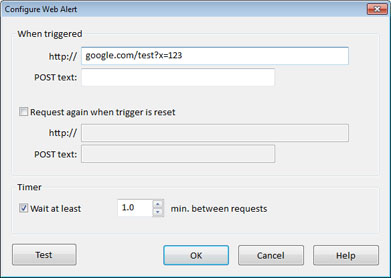
webalert.jpg
webalert.jpg (40.44 KiB) Viewed 3606 times
in the when triggered you will want to enter under the http://

if no username and password was set
EVENTGHOST_IP_ADDRESS:WEBSERVER_PORT/index.html?SOME_CAMERA_NAME.MotionTriggered

if a username and password was set
YOUR_USER_NAME:YOUR_PASSWORD@EVENTGHOST_IP_ADDRESS:WEBSERVER_PORT/index.html?SOME_CAMERA_NAME.MotionTriggered

If you want to receive notification when the motion has stopped check the box next to Request again when trigger reset and enter the following in the http box

if no username and password was set
EVENTGHOST_IP_ADDRESS:WEBSERVER_PORT/index.html?SOME_CAMERA_NAME.MotionReset

if a username and password was set
YOUR_USER_NAME:YOUR_PASSWORD@EVENTGHOST_IP_ADDRESS:WEBSERVER_PORT/index.html?SOME_CAMERA_NAME.MotionReset
If you like the work I have been doing then feel free to Image
Post Reply