Hey guys, a few years ago I had gotten help with getting my Snapstream remote to work with my DJ software:
viewtopic.php?f=2&t=1540
I am now using another software equally as much, this is a touchscreen jukebox software and it's GREAT, you should try it:
http://www.albumplayer.com/features.htm
Anyways, I would like to know if it will be possible for me to use one remote to control both OTSAV as we have done and also the Album Player software, not at the same time of course but would that be possible? If yes, I don't know if the person who had helped me [topix] is still here so I am posting here for help so can I ask if anyone help me with this please? I can either pay someone for the help or make a donation to this board as I had done the last time, thanks, regards, Mike.
Notice: This forum has been recovered from an old backup, so some content, links, and dates may be outdated. The forum is currently read-only while we restore sign-in and registration functionality. Details
If you find this forum valuable and would like to help keep it online, donations to help cover hosting and domain costs are greatly appreciated, but never expected. You can support the forum through Buy Me a Coffee or Ko-fi. Thank you for helping preserve the EventGhost community.
If you find this forum valuable and would like to help keep it online, donations to help cover hosting and domain costs are greatly appreciated, but never expected. You can support the forum through Buy Me a Coffee or Ko-fi. Thank you for helping preserve the EventGhost community.
Using one remote for 2 softwares possible?

Re: Using one remote for 2 softwares possible?
Hi Mike,
i'm still here from time to time I had a quick a look at the program and i think it will be doable to control it from EG. In fact i already have a first working plugin
  but still a bit more work.
To control both programs search for EnableExclusive and the task create/switch plugin.
i'm still here from time to time
I had a quick a look at the program and i think it will be doable to control it from EG. In fact i already have a first working plugin but still a bit more work.To control both programs search for EnableExclusive and the task create/switch plugin.
Re: Using one remote for 2 softwares possible?
Hey Topix, glad you're still here. If you can work it, I can either purchase an Album Player license in your name so you can own and use AP or I can donate here like last time, your choice. That AP jukebox software is incredible, so simple, a child can use it and it crossfades great just like OTSAV, has a lot of features and the developer is working on adding more new features. Regarding "EnableExclusive", I am not finding this as a software but rather an action in EG? Also, is this the plugin here titled "Task.zip"?
http://www.eventghost.org/forum/viewtop ... f=4&t=5890
http://www.eventghost.org/forum/viewtop ... f=4&t=5890
Re: Using one remote for 2 softwares possible?
Yes, EnableExclusive is an action in EG and the task plugin is a standard plugin. Just add it to your EG config and you will receive events when switch apps. These events can you use to trigger a EnableExclusive. With EnableExclusive you can enable/disable a folder in EG config tree.
Here is how it could look like:
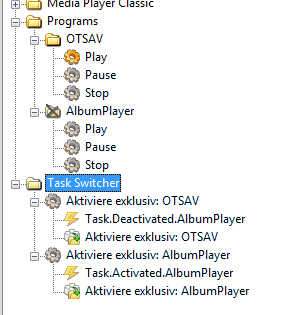
Here is how it could look like:
- Attachments
-
- Zwischenablage01.png (15.21 KiB) Viewed 4960 times
Re: Using one remote for 2 softwares possible?
Alright, please let me go in slomo here. I download the task.zip file, if this is right do I extract it? If yes, I then go to EG then FILE->OPEN and do I select the TASK folder or the _init_py file which is located inside the TASK folder please?
Re: Using one remote for 2 softwares possible?
First version of the plugin.
You don't need to download the task.zip. The task switcher plugin should be included in EG.
In your configuration just add it (from the menu 'Configuration' -> 'Add plugin' [-> Other -> Task Create/Switch Events] ).
You don't need to download the task.zip. The task switcher plugin should be included in EG.
In your configuration just add it (from the menu 'Configuration' -> 'Add plugin' [-> Other -> Task Create/Switch Events] ).
Re: Using one remote for 2 softwares possible?
Truly very sorry for the late reply Topix, I did the above, I also downloaded and saved the albumplayer.zip file and extracted it on the desktop but shouldn't that file be included into EG? Or what steps am I missing here please?topix wrote:[url=viewtopic.php?f=9&t=6838]
In your configuration just add it (from the menu 'Configuration' -> 'Add plugin' [-> Other -> Task Create/Switch Events] ).
Re: Using one remote for 2 softwares possible?
If you are on Win 7 or newer unzip the file to c:\ProgramData\EventGhost\plugins\ or otherwise to Program files\EventGhost\plugins\.
That's the way for every plugin that is not included in the EG installer. (For every plugin there should be a subfolder.)
That's the way for every plugin that is not included in the EG installer. (For every plugin there should be a subfolder.)
Re: Using one remote for 2 softwares possible?
topix wrote:If you are on Win 7 or newer unzip the file to c:\ProgramData\EventGhost\plugins\
This is where I'm at, I unzipped the AlbumPlayer.zip file into the above folder and please see a screenshot of the config tree, next?
[attachment=0]2015-03-17 15_36_39-Greenshot.png[/attachment]
- Attachments
-
Re: Using one remote for 2 softwares possible?
Now you need to add the plugin to EG and create macros for the actions you want to have. http://www.eventghost.net/docs/
Re: Using one remote for 2 softwares possible?
But I thought the plugin was already added, is it not?
Re: Using one remote for 2 softwares possible?
To use a plugin that is not included in the EG setup you need to:
- - have a subfolder for the plugin in \ProgramData\EventGhost\plugins\ or \Program files\EventGhost\plugins\
- - in the above subfolder put the __ini__.py file for the plugin (and eventually additional files needed by the plugin)
- - restart EG if it was running
- - in EG add the plugin to your configuration tree
Re: Using one remote for 2 softwares possible?
Damn, I think I may be having problems again with the remote itself as I was pressing functions on the button on saturday with OTSAV which was working fine but sometimes the functions was not responding, i will need to settle that first somehow to see where the problem lies then I'll get back to this.