Hi,
I've played around with the OSD and I'd like to share my observations and my volume bar.
First for the mute/unmute Webdings characters
"X├░" is not working for me (Windows 7 x64, System Locale: Bulgarian) But I found that inserting the character in Microsoft Word from the Webdings character map and then copy-pasting it in notepad produced the character:
which worked for me! It appears blank in this forum, as two vertical lines in Notepad and as a dot in EventGhost.
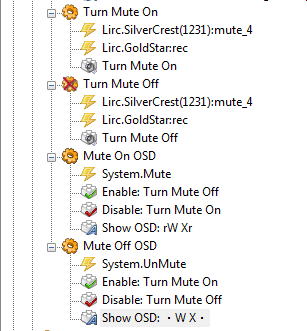
Second for the colored mute/unmute:
- Mute.PNG (19 KiB) Viewed 5916 times
This way you get two different OSDs for the two posible positions and making a new macro for the System.Mute and System.UnMute events guarantees that the OSDs will be shown regardless of how you mute the PC - by a remote control button, by keyboard button, by left clicking the mute icon etc.
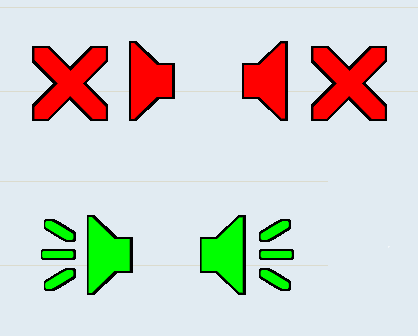
Example output:
- mute2.PNG (5.02 KiB) Viewed 5916 times
Now for the volume bar:
I've played very much with it - changing the characters, different fonts (including monospaced), sizes, changing the scale ratio etc.
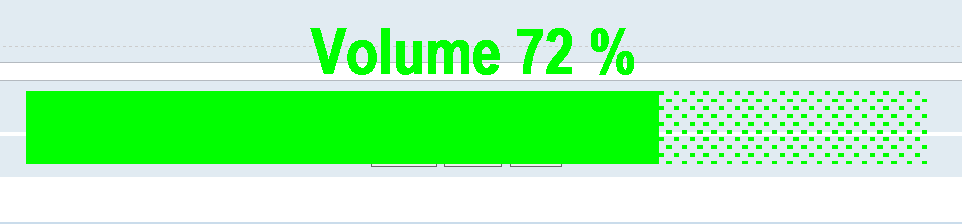
I've come up with this:
Code: Select all
{" "*19}Volume {int(float(eg.event.payload))} %
{unichr(0x2588) * (int(float(eg.event.payload))*1/5) + unichr(0x2591) * (20-int(float(eg.event.payload))*1/5)}
Font: Arial
Font style: Narrow Bold
Size: 48
Example:
- volume.PNG (8.05 KiB) Viewed 5916 times
The Show OSD action item has a "Bottom Center" Alignment with Vertical offset Y: 150
The OSD is triggered by a "System.Volume" event which makes it show regardless of how you change the volume. This creates some issues with the remote controls because when a button is pressed for a long time, the "System.Volume" events show up at once after you release the button. I've battled this by copy-pasting additional "Show OSD" items in the "Change Master Volume" Macro to show explicitly on every Change Volume event, generated by a remote control. Also I've added Clear Pending Events items because the performace was getting very bad - EventGhost continues to process Change Volume events long after the volume is changed.
Generally playing with the above code shows the following:
1. Characters "|" and "." are rendered more quickly than using unichr(0x2588) and unichr(0x2591)
2. Changing the font size bigger slows down the rendering and performance - take a look at the CPU usage during changing volume down or up
3. Making the volume scale more granular worsens the performance. See 5.
4. If you are going to change the font size, you will have to change the number "19" times the " " character.
5. If you are going to change the ratio of the scale, make sure that it is correct. You can try with 1/2 or 1/4 and subtract from 50 or 25 the ramaining characters accordingly.
If someone has an idea how to make the volume bar more quick responsive when using more granular scale, please share


 Where do I put it


