Notice: This forum has been recovered from an old backup, so some content, links, and dates may be outdated. The forum is currently read-only while we restore sign-in and registration functionality. Details

If you find this forum valuable and would like to help keep it online, donations to help cover hosting and domain costs are greatly appreciated, but never expected. You can support the forum through Buy Me a Coffee or Ko-fi. Thank you for helping preserve the EventGhost community.

Using OSD and display current volume level [SOLVED]

If you have a question or need help, this is the place to be.
altainta
Posts: 29
Joined: Sun Nov 28, 2010 5:58 am

Re: Using OSD and display current volume level [SOLVED]

Post by altainta »

^^
@Vilsepi
Tried it but i am getting error
check the attachment
also want to tell you that used all of the above doesn't work
What i use currently is this

Code: Select all

Volume {'|'*int(round(eg.result))+'.'*(100-int(round(eg.result)))} {int(round(eg.result))}%
works perfectly for me on windows xp sp3
Kindly provide solution for the above osds very nice one you have there (short version)
Also can you tell me how to decorate OSM or OSE ?
Attachments
problem.JPG
bskchaos
Experienced User
Posts: 56
Joined: Tue Mar 25, 2008 3:04 pm

Re: Using OSD and display current volume level [SOLVED]

Post by bskchaos »

Try this:

Code: Select all

<?xml version="1.0" encoding="UTF-8" ?>
<EventGhost Version="1582">
    <Folder Name="Volume" Expanded="True">
        <Macro Name="Increase Volume">
            <Event Name="X10.VolumeUp" />
            <Event Name="HID.Button.232" />
            <Action>
                System.ChangeMasterVolumeBy(5.0, 0)
            </Action>
            <Action>
                EventGhost.ShowOSD(u'{"c" *int(round(eg.result) * 0.20) + "g" *int(round(100-(eg.result)) * 0.20)}', u'0;-12;0;0;0;400;0;0;0;2;3;2;1;18;Webdings', (255, 255, 255), (0, 0, 0), 3, (8, 48), 0, 2.0, True)
            </Action>
            <Action>
                EventGhost.AutoRepeat(0.25, 0.050000000000000003, 0.01, 0.20000000000000001)
            </Action>
        </Macro>
        <Macro Name="Decrease Volume">
            <Event Name="X10.VolumeDown" />
            <Event Name="HID.Button.233" />
            <Action>
                System.ChangeMasterVolumeBy(-5.0, 0)
            </Action>
            <Action>
                EventGhost.ShowOSD(u'{"c" *int(round(eg.result) * 0.20) + "g" *int(round(100-(eg.result)) * 0.20)}', u'0;-12;0;0;0;400;0;0;0;2;3;2;1;18;Webdings', (255, 255, 255), (0, 0, 0), 3, (8, 48), 0, 2.0, True)
            </Action>
            <Action>
                EventGhost.AutoRepeat(0.25, 0.050000000000000003, 0.01, 0.20000000000000001)
            </Action>
        </Macro>
        <Macro Name="Mute Sound Card">
            <Event Name="X10.Mute" />
            <Event Name="HID.Button.225" />
            <Action>
                System.ToggleMute(0)
            </Action>
        </Macro>
        <Macro Name="Show OSD: Mute ON">
            <Event Name="System.UnMute" />
            <Action>
                EventGhost.ShowOSD(u'X\xf0', u'0;-96;0;0;0;400;0;0;0;2;3;2;1;18;Webdings', (255, 255, 255), (0, 0, 0), 3, (32, 32), 0, 2.0, True)
            </Action>
        </Macro>
        <Macro Name="Show OSD: Mute ON">
            <Event Name="System.Mute" />
            <Action>
                EventGhost.ShowOSD(u'Xr', u'0;-96;0;0;0;400;0;0;0;2;3;2;1;18;Webdings', (255, 255, 255), (0, 0, 0), 3, (32, 32), 0, 0.0, True)
            </Action>
        </Macro>
    </Folder>
</EventGhost>
altainta
Posts: 29
Joined: Sun Nov 28, 2010 5:58 am

Re: Using OSD and display current volume level [SOLVED]

Post by altainta »

The volume is working fien now
But the mute is not working

Also i want to ask if you modified the OSM and OSE display ? i mean in fancy background it is really irritating me now with the usual back ground..
User avatar
Luca Brasi
Experienced User
Posts: 262
Joined: Sat Oct 11, 2008 12:39 pm

Re: Using OSD and display current volume level [SOLVED]

Post by Luca Brasi »

Hey guys,

I try to figure this for my Onkyo Amp which will give me hex values for the volume when I call it via HDMI-CEC and System Audio Control>Give Audio Status.
I am completely lost because I know almost nothing about all this programming stuff. I've been trying to bring some light in it for hours but to no avail :-) Maybe one of you could help me out...

The values given are like this: 0 1 2 3 4 5 6 7 8 9 0A 0B 0C...
The scale ranges until a max of hex 62 (which equals 98 decimal).
Strange thing is the amp's display gives me decimal values from Min, 1,2,3,...,78,Max

Now what i would love to have is:

- A volume bar which corresponds with a 0-100% scale (even better would be to have it corresponding to the display e.g. 0-80)

I could partly make this work by taking out the "round" and putting in a base of 16 in the code from the first post, but the volume bar will change its size then with increased or decreased volume...
My Code is this

Code: Select all

Volume {'|'*int((eg.result),16)+'.'*(100-int((eg.result),16))} {int((eg.result),16)}%
I just took it from here and started to try to make it work. honestly I have no clue about what I am doing here :-)

Anyone here who wants to dig into this?

Thanks!
Win10 x64 Prof. / Eventghost latest / MCE Plugin / MCE RC6 Receiver / Logitech Harmony Hub / MediaPortal / kodi
tedaz
Posts: 2
Joined: Tue Mar 11, 2014 3:35 am

Re: Using OSD and display current volume level [SOLVED]

Post by tedaz »

InterlinkKnight wrote:Thanks to the users "jonib" and "olurz", I can now give an easy-to-understand instructions to display the current volume in percentage or bar and the MUTE state (if the sound is ON or OFF):
All codes in this topic do not work on windows 7 64 bit, is there any updated version of these codes for Win7 x64?
bskchaos
Experienced User
Posts: 56
Joined: Tue Mar 25, 2008 3:04 pm

Re: Using OSD and display current volume level [SOLVED]

Post by bskchaos »

I have been using the same code for years.

This are my current volume control + OSD, working on all my Win7-x64

Code: Select all

<?xml version="1.0" encoding="UTF-8" ?>
<EventGhost Version="1640">
    <Folder Name="OSD" id="481" Expanded="True">
        <Macro Name="Increase Volume" Expanded="True">
            <Event Name="G500.Button.232" />
            <Event Name="HID.Button.4" />
            <Action>
                System.ChangeMasterVolumeBy(5.0, 0)
            </Action>
            <Action>
                EventGhost.ShowOSD(u'{"c" *int(round(eg.result) * 0.20) + "g" *int(round(100-(eg.result)) * 0.20)}', u'0;-12;0;0;0;400;0;0;0;2;3;2;1;18;Webdings', (255, 255, 255), (0, 0, 0), 3, (8, 48), 0, 2.0, True)
            </Action>
            <Action>
                EventGhost.AutoRepeat(0.25, 0.050000000000000003, 0.01, 0.20000000000000001)
            </Action>
        </Macro>
        <Macro Name="Decrease Volume" Expanded="True">
            <Event Name="G500.Button.233" />
            <Event Name="HID.Button.3" />
            <Action>
                System.ChangeMasterVolumeBy(-5.0, 0)
            </Action>
            <Action>
                EventGhost.ShowOSD(u'{"c" *int(round(eg.result) * 0.20) + "g" *int(round(100-(eg.result)) * 0.20)}', u'0;-12;0;0;0;400;0;0;0;2;3;2;1;18;Webdings', (255, 255, 255), (0, 0, 0), 3, (8, 48), 0, 2.0, True)
            </Action>
            <Action>
                EventGhost.AutoRepeat(0.25, 0.050000000000000003, 0.01, 0.20000000000000001)
            </Action>
        </Macro>
        <Macro Name="Mute Sound Card" Expanded="True">
            <Event Name="HID.Button.2" />
            <Action>
                System.ToggleMute(0)
            </Action>
        </Macro>
        <Macro Name="Show OSD: Mute ON" Expanded="True">
            <Event Name="System.UnMute" />
            <Action>
                EventGhost.ShowOSD(u'X\xf0', u'0;-96;0;0;0;400;0;0;0;2;3;2;1;18;Webdings', (255, 255, 255), (0, 0, 0), 3, (32, 32), 0, 2.0, True)
            </Action>
        </Macro>
        <Macro Name="Show OSD: Mute ON" Expanded="True">
            <Event Name="System.Mute" />
            <Action>
                EventGhost.ShowOSD(u'Xr', u'0;-96;0;0;0;400;0;0;0;2;3;2;1;18;Webdings', (255, 255, 255), (0, 0, 0), 3, (32, 32), 0, 0.0, True)
            </Action>
        </Macro>
    </Folder>
</EventGhost>
thahim
Posts: 17
Joined: Fri Jul 11, 2014 5:33 am

Re: Using OSD and display current volume level [SOLVED]

Post by thahim »

@InterlinkKnight thank you so much this has helped me alot,
but now i want eventghost to let my phone know whats the current volume level through autoremote message.
so what should i type in message field to do this?
EventGhost Version 0.4.1.r1669
Windows 7
shaggy79
Experienced User
Posts: 129
Joined: Sun Jul 13, 2014 4:57 pm

Re: Using OSD and display current volume level [SOLVED]

Post by shaggy79 »

The user bskchaos submit another way to show a volume bar and mute.

Is more complicated to setup, so I better publish the entire code of the settings:

Code: Select all

<?xml version="1.0" encoding="UTF-8" ?>
<EventGhost Version="1540">
    <Folder Name="Volume Control" Expanded="True">
        <Macro Name="Decrease Volume" Expanded="True">
            <Event Name="X10.VolumeDown" />
            <Event Name="ErgoMouse.Button.234" />
            <Event Name="HID.Button.3" />
            <Action>
                System.ChangeMasterVolumeBy(-5.0, 0)
            </Action>
            <Action id="762">
                EventGhost.ShowOSD(u'{"c" *int(round(eg.result) * 0.20) + "g" *int(round(100-(eg.result)) * 0.20)}', u'0;-12;0;0;0;400;0;0;0;2;3;2;1;18;Webdings', (255, 255, 255), (0, 0, 0), 3, (8, 48), 0, 2.0, True)
            </Action>
            <Action>
                EventGhost.AutoRepeat(0.40000000000000002, 0.050000000000000003, 0.01, 0.40000000000000002)
            </Action>
        </Macro>
        <Macro Name="Increase Volume" Expanded="True">
            <Event Name="X10.VolumeUp" />
            <Event Name="ErgoMouse.Button.233" />
            <Event Name="HID.Button.4" />
            <Action>
                System.ChangeMasterVolumeBy(5.0, 0)
            </Action>
            <Action id="770">
                EventGhost.ShowOSD(u'{"c" *int(round(eg.result) * 0.20) + "g" *int(round(100-(eg.result)) * 0.20)}', u'0;-12;0;0;0;400;0;0;0;2;3;2;1;18;Webdings', (255, 255, 255), (0, 0, 0), 3, (8, 48), 0, 2.0, True)
            </Action>
            <Action>
                EventGhost.AutoRepeat(0.40000000000000002, 0.050000000000000003, 0.01, 0.40000000000000002)
            </Action>
        </Macro>
        <Macro Name="Mute Sound Card" Expanded="True">
            <Event Name="X10.Mute" />
            <Action>
                System.ToggleMute(0)
            </Action>
            <Action>
                EventGhost.NewJumpIf(XmlIdLink(777), 0, False)
            </Action>
            <Action>
                EventGhost.ShowOSD(u'X\xf0', u'0;-64;0;0;0;400;0;0;0;2;3;2;1;18;Webdings', (255, 255, 255), (0, 0, 0), 3, (16, 56), 0, 2.0, True)
            </Action>
        </Macro>
        <Macro Name="Show OSD: Mute ON" id="777" Expanded="True">
            <Action>
                EventGhost.ShowOSD(u'Xr', u'0;-64;0;0;0;400;0;0;0;2;3;2;1;18;Webdings', (255, 255, 255), (0, 0, 0), 3, (16, 56), 0, 0.0, True)
            </Action>
        </Macro>
    </Folder>
</EventGhost>
What do I do with the code :oops: Where do I put it :?:
Cheers Paul.
thahim
Posts: 17
Joined: Fri Jul 11, 2014 5:33 am

Re: Using OSD and display current volume level [SOLVED]

Post by thahim »

Kindly tell me how to send System Volume to autoremote on my phone.
EventGhost Version 0.4.1.r1669
Windows 7
shaggy79
Experienced User
Posts: 129
Joined: Sun Jul 13, 2014 4:57 pm

Re: Using OSD and display current volume level [SOLVED]

Post by shaggy79 »

Hi all, 8)
I'm using "Volume {int(round(eg.result))}%" for my OSD but ideally I want :-

Code: Select all

<?xml version="1.0" encoding="UTF-8" ?>
<EventGhost Version="1540">
    <Folder Name="Volume Control" Expanded="True">
        <Macro Name="Decrease Volume" Expanded="True">
            <Event Name="X10.VolumeDown" />
            <Event Name="ErgoMouse.Button.234" />
            <Event Name="HID.Button.3" />
            <Action>
                System.ChangeMasterVolumeBy(-5.0, 0)
            </Action>
            <Action id="762">
                EventGhost.ShowOSD(u'{"c" *int(round(eg.result) * 0.20) + "g" *int(round(100-(eg.result)) * 0.20)}', u'0;-12;0;0;0;400;0;0;0;2;3;2;1;18;Webdings', (255, 255, 255), (0, 0, 0), 3, (8, 48), 0, 2.0, True)
            </Action>
            <Action>
                EventGhost.AutoRepeat(0.40000000000000002, 0.050000000000000003, 0.01, 0.40000000000000002)
            </Action>
        </Macro>
        <Macro Name="Increase Volume" Expanded="True">
            <Event Name="X10.VolumeUp" />
            <Event Name="ErgoMouse.Button.233" />
            <Event Name="HID.Button.4" />
            <Action>
                System.ChangeMasterVolumeBy(5.0, 0)
            </Action>
            <Action id="770">
                EventGhost.ShowOSD(u'{"c" *int(round(eg.result) * 0.20) + "g" *int(round(100-(eg.result)) * 0.20)}', u'0;-12;0;0;0;400;0;0;0;2;3;2;1;18;Webdings', (255, 255, 255), (0, 0, 0), 3, (8, 48), 0, 2.0, True)
            </Action>
            <Action>
                EventGhost.AutoRepeat(0.40000000000000002, 0.050000000000000003, 0.01, 0.40000000000000002)
            </Action>
        </Macro>
        <Macro Name="Mute Sound Card" Expanded="True">
            <Event Name="X10.Mute" />
            <Action>
                System.ToggleMute(0)
            </Action>
            <Action>
                EventGhost.NewJumpIf(XmlIdLink(777), 0, False)
            </Action>
            <Action>
                EventGhost.ShowOSD(u'X\xf0', u'0;-64;0;0;0;400;0;0;0;2;3;2;1;18;Webdings', (255, 255, 255), (0, 0, 0), 3, (16, 56), 0, 2.0, True)
            </Action>
        </Macro>
        <Macro Name="Show OSD: Mute ON" id="777" Expanded="True">
            <Action>
                EventGhost.ShowOSD(u'Xr', u'0;-64;0;0;0;400;0;0;0;2;3;2;1;18;Webdings', (255, 255, 255), (0, 0, 0), 3, (16, 56), 0, 0.0, True)
            </Action>
        </Macro>
    </Folder>
</EventGhost>
Where do I put the code for this to work? :oops:
Also is there a way to change the colour of the 'MUTE' icon/words like :?: ....

Sound ON
Sound OFF

Same for the 'VOLUME' but in 3 stages?
0-33%
34-66%
67-100%

Cheers Paul. :P
User avatar
InterlinkKnight
Posts: 29
Joined: Mon Sep 13, 2010 1:17 am
Contact:

Re: Using OSD and display current volume level [SOLVED]

Post by InterlinkKnight »

thahim wrote:@InterlinkKnight thank you so much this has helped me alot,
but now i want eventghost to let my phone know whats the current volume level through autoremote message.
so what should i type in message field to do this?
No idea how do that.


shaggy79 wrote:What do I do with the code :oops: Where do I put it :?:
Cheers Paul.
You put that in the configuration file (.xml)


I don't know ether how change text color in 3 stages.


I use Windows 7 64bits and works, so not sure why someone say doesn't work
Shade Of Fear
Posts: 3
Joined: Tue Mar 24, 2015 9:17 am

Re: Using OSD and display current volume level [SOLVED]

Post by Shade Of Fear »

Hi,

I've played around with the OSD and I'd like to share my observations and my volume bar.

First for the mute/unmute Webdings characters

Code: Select all

Xr and X├░
"X├░" is not working for me (Windows 7 x64, System Locale: Bulgarian) But I found that inserting the character in Microsoft Word from the Webdings character map and then copy-pasting it in notepad produced the character:

Code: Select all

´â░
which worked for me! It appears blank in this forum, as two vertical lines in Notepad and as a dot in EventGhost.

Second for the colored mute/unmute:
Mute.PNG
Mute.PNG (19 KiB) Viewed 5911 times
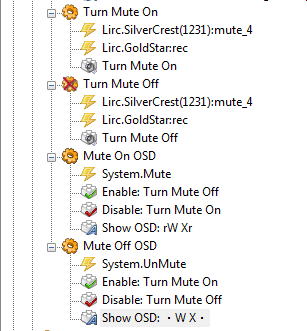
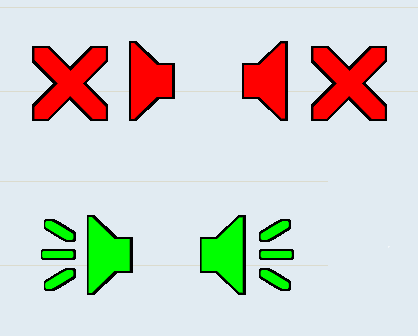
This way you get two different OSDs for the two posible positions and making a new macro for the System.Mute and System.UnMute events guarantees that the OSDs will be shown regardless of how you mute the PC - by a remote control button, by keyboard button, by left clicking the mute icon etc.

Example output:
mute2.PNG
mute2.PNG (5.02 KiB) Viewed 5911 times
Now for the volume bar:

I've played very much with it - changing the characters, different fonts (including monospaced), sizes, changing the scale ratio etc.

I've come up with this:

Code: Select all

{" "*19}Volume {int(float(eg.event.payload))} %
{unichr(0x2588) * (int(float(eg.event.payload))*1/5) + unichr(0x2591) * (20-int(float(eg.event.payload))*1/5)}
Font: Arial
Font style: Narrow Bold
Size: 48

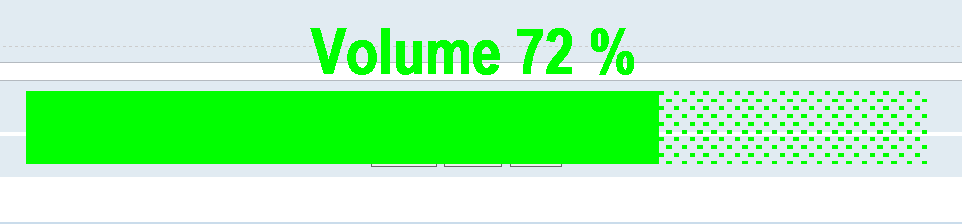
Example:
volume.PNG
volume.PNG (8.05 KiB) Viewed 5911 times
The Show OSD action item has a "Bottom Center" Alignment with Vertical offset Y: 150

The OSD is triggered by a "System.Volume" event which makes it show regardless of how you change the volume. This creates some issues with the remote controls because when a button is pressed for a long time, the "System.Volume" events show up at once after you release the button. I've battled this by copy-pasting additional "Show OSD" items in the "Change Master Volume" Macro to show explicitly on every Change Volume event, generated by a remote control. Also I've added Clear Pending Events items because the performace was getting very bad - EventGhost continues to process Change Volume events long after the volume is changed.

Generally playing with the above code shows the following:

1. Characters "|" and "." are rendered more quickly than using unichr(0x2588) and unichr(0x2591)
2. Changing the font size bigger slows down the rendering and performance - take a look at the CPU usage during changing volume down or up
3. Making the volume scale more granular worsens the performance. See 5.
4. If you are going to change the font size, you will have to change the number "19" times the " " character.
5. If you are going to change the ratio of the scale, make sure that it is correct. You can try with 1/2 or 1/4 and subtract from 50 or 25 the ramaining characters accordingly.

If someone has an idea how to make the volume bar more quick responsive when using more granular scale, please share :)
Post Reply